How to Track Polymarket Trades Using Envio's HyperSync
 Nikhil Bhintade
- Build a real-time Polymarket trade tracker using Envio HyperSync and TypeScript with Bun.
- Stream block heights from Polygon and query OrderFilled events from the Polymarket Exchange contracts on each new block.
- Decode events with Viem, identify buy vs sell trades by checking
makerAssetId, and calculate price per share. - Extend with filters for trade amount or specific wallet addresses to track high-conviction traders.
Since the rise of prediction markets like Polymarket and Kalshi, many people have been tracking activity on them to get a sense of where the money is going. If we try to track every trade on these prediction markets, you will see many people betting like $10 here, $15 there. If you want a stronger signal, then you should track trades with higher amounts, since those traders have more conviction in the outcome they are betting on.
In this article, we are going to build a tool with HyperSync where you can track Polymarket trades above a certain amount. We also have one feature where you can track trades from certain addresses. If you know some addresses from good traders, you can follow them too.
This guide covers live trades. For historical trade data instead, How to Get Polymarket Trade Data walks through the free public dataset and how to run the open-source live indexer.
Prerequisites
We are going to use Bun for this article, so make sure you have it installed. If not, please check the Bun documentation for installation instructions. If you want to use some other runtime that supports TypeScript, you can do that too.
You will also need an Envio API token to access HyperSync. If you don’t have it already, go to https://envio.dev/app/api-tokens and you can find your token there.
Here are step-by-step instructions for creating new API tokens: https://docs.envio.dev/docs/HyperSync/api-tokens#generating-api-tokens
What is HyperSync
HyperSync is Envio's high-performance blockchain data retrieval layer, built as an alternative to traditional JSON-RPC endpoints. It gives developers direct access to onchain data up to 2000x faster than standard RPC methods.
For this article, we are using HyperSync to stream real-time block heights and query Polymarket trade events on Polygon as they happen. Client libraries are available for Python, Rust, Node.js, and Go. HyperSync supports 81+ EVM chains, so the same approach works across any supported network.
OrderFilled Event
Before we start writing the script, let’s talk about the OrderFilled event. This event is emitted when a trade has been filled, so these are confirmed trades where a user is buying or selling shares. Here is the event:
    event OrderFilled(
        bytes32 indexed orderHash,
        address indexed maker,
        address indexed taker,
        uint256 makerAssetId,
        uint256 takerAssetId,
        uint256 makerAmountFilled,
        uint256 takerAmountFilled,
        uint256 fee
    );
Most of the fields are self-explanatory, but we still haven’t answered one question: if this event is emitted for all orders, then how do we know which one is buy vs sell? If the value of makerAssetId is 0, then that is a buy order where the user is buying shares, and vice versa.
To calculate price per share for a buy trade, we can use makerAmountFilled and takerAmountFilled.
Price per share in a buy trade = makerAmountFilled / takerAmountFilled
To calculate per-share price in a sell trade, we just switch those values. Now that we have a basic understanding of what data to fetch and what that data tells us, we can start writing our script with Bun.
Using HyperSync Client
To create a Bun project and install the HyperSync client along with Viem for decoding events, you can use the following commands:
mkdir track-trades && cd track-trades
bun init -y
bun add @envio-dev/hypersync-client viem
If you’re new to HyperSync clients, please start by going through these examples: https://docs.envio.dev/docs/HyperSync/hypersync-clients.
Let’s discuss how we are going to structure our script. Instead of streaming events directly, we are going to stream height. When we get a new height, we query HyperSync to fetch the data we need. Here is a visual representation of that:
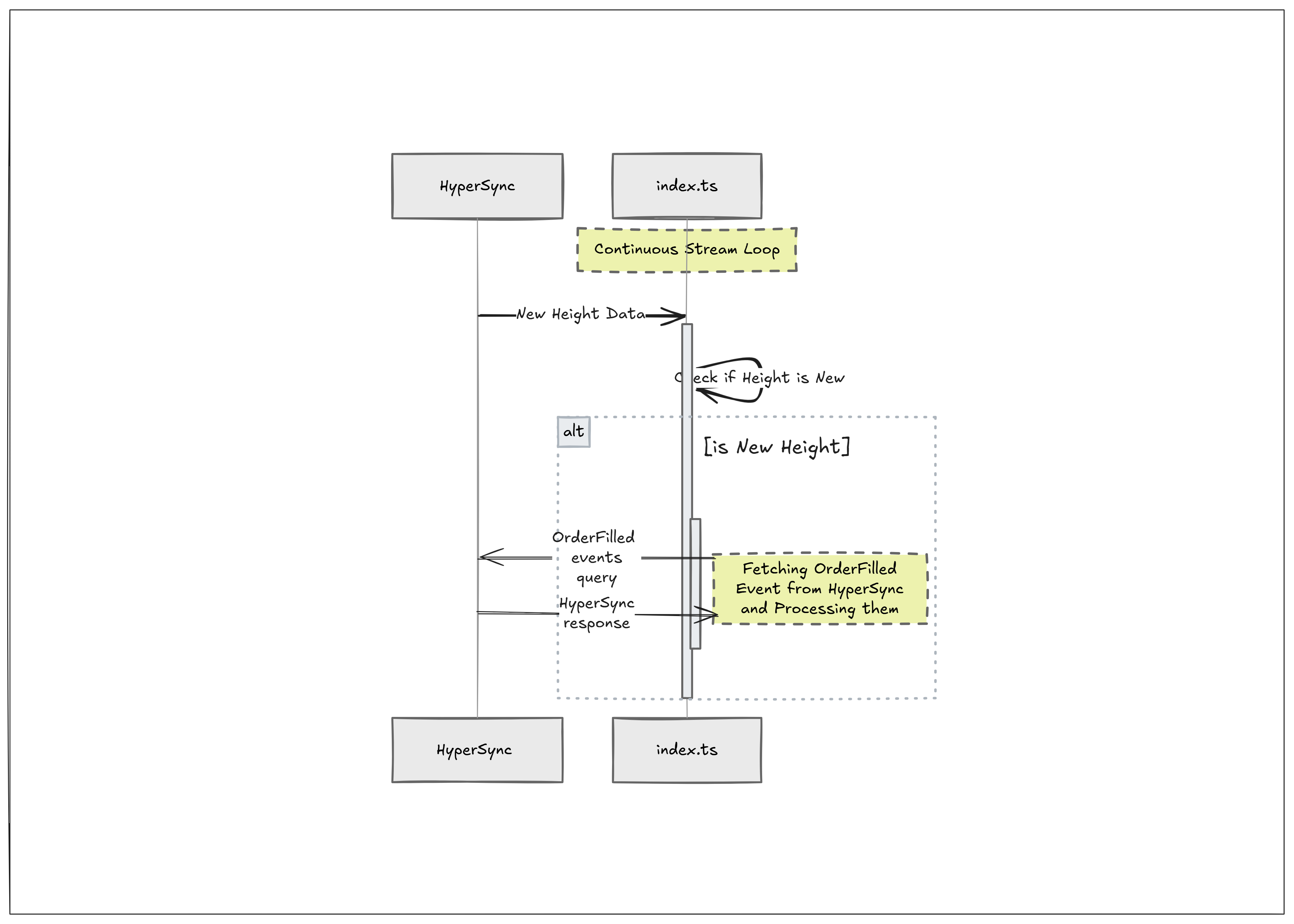
Stream Height
We already have a height-streaming example in the HyperSync Node client, and we are going to use that here. Open index.ts and paste the following snippet, then we can go over it.
import {
HypersyncClient,
  type Query, // for later use
  type QueryResponseData, // for later use
} from "@envio-dev/hypersync-client";
import { decodeEventLog } from "viem"; // for later use

async function main() {
  // Create hypersync client using the mainnet hypersync endpoint
  const client = new HypersyncClient({
    url: "https://polygon.hypersync.xyz",
    apiToken: process.env.ENVIO_API_TOKEN!,
  });

  // Create a height stream to monitor blockchain height changes
  const heightStream = await client.streamHeight();

  console.log("Height stream created. Listening for height updates...");

  // Track the last known height to detect changes

  try {
    while (true) {
      // Receive the next event from the height stream
      const event = await heightStream.recv();

      if (event === null) {
        console.log("Height stream ended by server");
        break;
      }

      // Handle different types of events
      switch (event.type) {
        case "Height":
          await fetchOrderFilledEvents(client, event.height); // will be explained later
          break;

        case "Connected":
          console.log(`Connected to height stream`);
          break;

        case "Reconnecting":
          console.log(
            `Reconnecting to height stream in ${event.delayMillis}ms due to error: ${event.errorMsg}`,
          );
          break;

        default:
          // Tells the typescript compiler that we have covered all possible event types
          const _exhaustiveCheck: never = event;
          throw new Error("Unhandled event type");
      }
    }
  } catch (error) {
    console.error("Error in height stream:", error);
  } finally {
    // Always close the stream to clean up resources
    await heightStream.close();
    console.log("Height stream closed");
  }
}

main().catch(console.error);
The first thing we are doing in main is creating the HyperSync client with url and apiToken (which should be stored in a .env file, so create one and store your Envio API token there).
We have a streamHeight function on the client that emits 3 types of events: Height, Connected, and Reconnecting. When we get a new Height event with the latest block number, we call fetchOrderFilledEvents, where our parsing logic will live.
After creating the stream with streamHeight, we need to listen to those events, so we created a while loop that checks data from .recv() and a switch statement to act on the event type we get. The rest is mostly boilerplate error handling, so we don’t need to go too deep into that.
Now we have our streaming logic, so we can move to fetchOrderFilledEvents, which will handle the event parsing.
fetchOrderFilledEvents Function
This function will take the height we got from streamHeight and query blocks to get the events we want. Let’s start with a few basic things we need for fetching and decoding the data:
- Contract addresses
- ABI of the event
- Event signature hash (aka
Topic0)
Here they are, so add them somewhere at the top of the file.
export const EXCHANGE_ADDRESSES = [
  "0x4bfb41d5b3570defd03c39a9a4d8de6bd8b8982e",
  "0xc5d563a36ae78145c45a50134d48a1215220f80a",
].map((a) => a.toLowerCase());

const ORDER_FILLED_TOPIC =
  "0xd0a08e8c493f9c94f29311604c9de1b4e8c8d4c06bd0c789af57f2d65bfec0f6".toLowerCase();

const ORDER_FILLED_ABI = {
  anonymous: false,
  inputs: [
    {
      indexed: true,
      internalType: "bytes32",
      name: "orderHash",
      type: "bytes32",
    },
    {
      indexed: true,
      internalType: "address",
      name: "maker",
      type: "address",
    },
    {
      indexed: true,
      internalType: "address",
      name: "taker",
      type: "address",
    },
    {
      indexed: false,
      internalType: "uint256",
      name: "makerAssetId",
      type: "uint256",
    },
    {
      indexed: false,
      internalType: "uint256",
      name: "takerAssetId",
      type: "uint256",
    },
    {
      indexed: false,
      internalType: "uint256",
      name: "makerAmountFilled",
      type: "uint256",
    },
    {
      indexed: false,
      internalType: "uint256",
      name: "takerAmountFilled",
      type: "uint256",
    },
    {
      indexed: false,
      internalType: "uint256",
      name: "fee",
      type: "uint256",
    },
  ],
  name: "OrderFilled",
  type: "event",
} as const;

const ORDER_FILLED_ABI_ITEMS = [ORDER_FILLED_ABI] as const; // we can push it to query directly as an array
Let's define the function signature. We are going to pass the HyperSync client and block height to this function.
async function fetchOrderFilledEvents(client: HypersyncClient, height: number);
To fetch the data from HyperSync, we need to create a query. If you're not familiar with HyperSync queries, the query builder at https://builder.hypersync.xyz/ is a good starting point. In short, in this query we define which event from which contracts we want to fetch, and what fields we want in the response.
const query: Query = {
  fromBlock: height,
  logs: [
    {
      address: EXCHANGE_ADDRESSES,
      topics: [[ORDER_FILLED_TOPIC], [], [], []],
    },
  ],
  fieldSelection: {
    log: [
      "Data",
      "Address",
      "Topic0",
      "Topic1",
      "Topic2",
      "Topic3",
      "TransactionHash",
      "BlockNumber",
    ],
  },
};
Use the get function to fetch the data and store the logs/events in an array that we can loop over.
const res = await client.get(query);
const logs = (res.data as QueryResponseData).logs ?? [];
Let’s loop over that array and use decodeEventLog from Viem to decode the data so we can analyze it.
for (const log of logs) {
  const decoded = decodeEventLog({
    abi: ORDER_FILLED_ABI_ITEMS,
    data: log.data as `0x${string}`,
    topics: log.topics as [`0x${string}`, ...`0x${string}`[]],
  });

  if (decoded.eventName !== "OrderFilled") {
    continue;
  }

  const { makerAssetId, makerAmountFilled, takerAmountFilled, maker, taker } =
    decoded.args as {
      makerAssetId: bigint;
      makerAmountFilled: bigint;
      takerAmountFilled: bigint;
      maker: string;
      taker: string;
    };

  // TODO: Check if trade is Buy if yes, then log details along with price per share
}
The last part of this script is checking if the trade is a buy trade, which we can confirm when makerAssetId is 0. We also need to calculate price per share. We already know the formula: makerAmountFilled / takerAmountFilled. That value should be formatted to 6 decimals, and then we have the price per share.
function formatRatio(
  numerator: bigint,
  denominator: bigint,
  precision = 6,
): string {
  if (denominator === 0n) {
    return "0";
  }

  const scale = 10n ** BigInt(precision);
  const scaled = (numerator * scale) / denominator;
  const whole = scaled / scale;
  const fraction = (scaled % scale).toString().padStart(precision, "0");
  return `${whole}.${fraction}`;
}
fetchOrderFilledEvents should look like this at the end.
async function fetchOrderFilledEvents(client: HypersyncClient, height: number) {
  // Topic0: 0xd0a08e8c493f9c94f29311604c9de1b4e8c8d4c06bd0c789af57f2d65bfec0f6

  const query: Query = {
    fromBlock: height,
    logs: [
      {
        address: EXCHANGE_ADDRESSES,
        topics: [[ORDER_FILLED_TOPIC], [], [], []],
      },
    ],
    fieldSelection: {
      log: [
        "Data",
        "Address",
        "Topic0",
        "Topic1",
        "Topic2",
        "Topic3",
        "TransactionHash",
        "BlockNumber",
      ],
    },
  };

  const res = await client.get(query);
  const logs = (res.data as QueryResponseData).logs ?? [];

  for (const log of logs) {
    const decoded = decodeEventLog({
      abi: ORDER_FILLED_ABI_ITEMS,
      data: log.data as `0x${string}`,
      topics: log.topics as [`0x${string}`, ...`0x${string}`[]],
    });

    if (decoded.eventName !== "OrderFilled") {
      continue;
    }

    const { makerAssetId, makerAmountFilled, takerAmountFilled, maker, taker } =
      decoded.args as {
        makerAssetId: bigint;
        makerAmountFilled: bigint;
        takerAmountFilled: bigint;
        maker: string;
        taker: string;
      };

    // TODO: Check if trade is Buy if yes, then log details along with price per share
    if (makerAssetId === 0n) {
      const pricePerShare = formatRatio(makerAmountFilled, takerAmountFilled);
      console.log(
        `[BUY] block=${log.blockNumber} tx=${log.transactionHash} maker=${maker} taker=${taker} pricePerShare=${pricePerShare}`,
      );
    }
  }
}
Complete Project
You can check the project code in this repo: https://github.com/enviodev/track-poly-trades
For the full production-scale Polymarket indexer covering all 8 subgraph domains and 4 billion events, see the Polymarket HyperIndex Case Study.
Next Steps
Our aim was to create a tracker that filters trades based on amount and addresses, but we haven’t completed that aim yet. This article gave you the main steps you need to create that tool, so your next step is to add filtering for amount and addresses.
Don’t forget to share it with us on socials or in our Discord. Looking forward to seeing what you build on top of this.
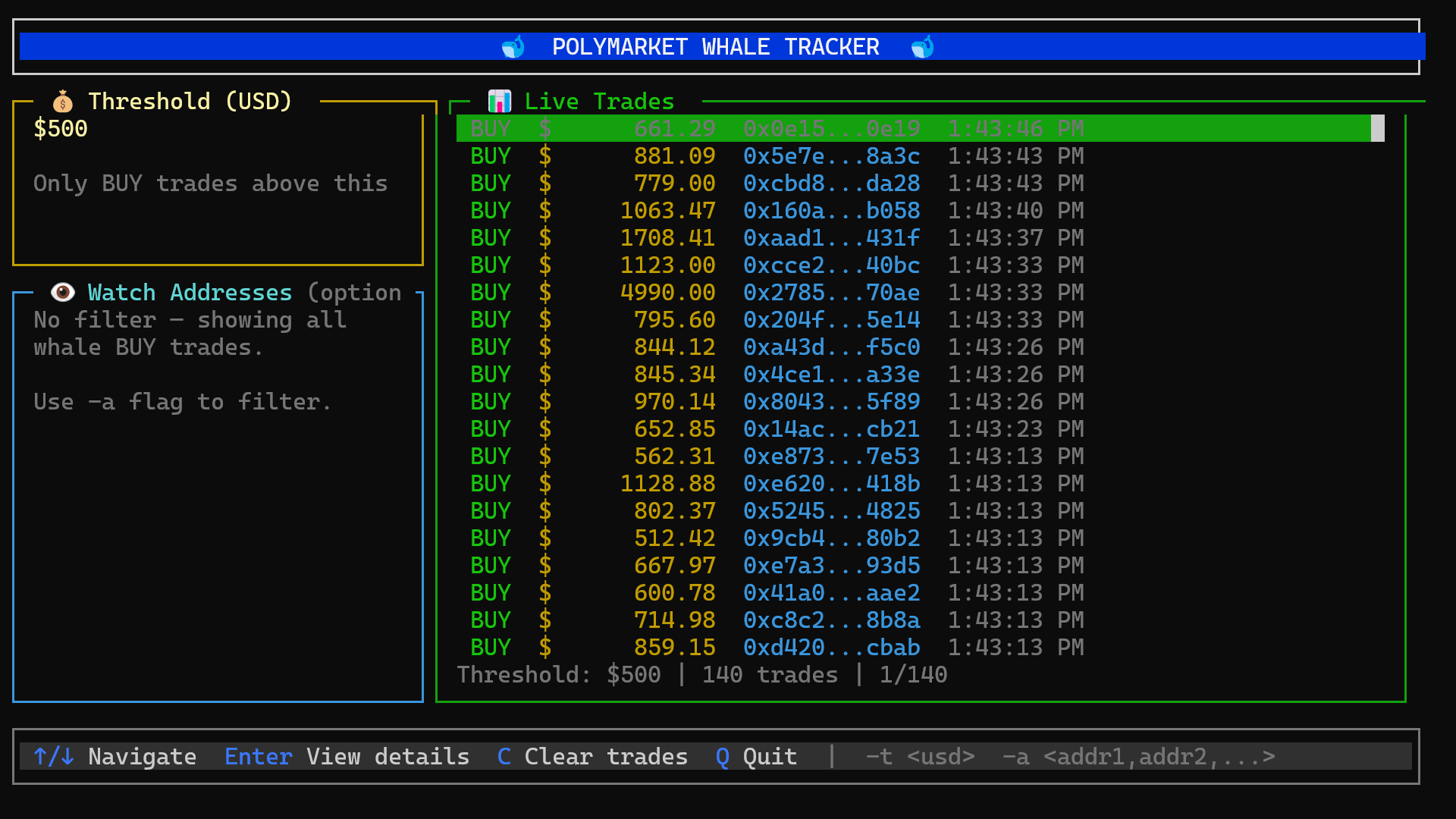
Poly-Whales TUI
Don’t want to set up the full project but still want to try it out? You can use the Poly-Whales TUI.
Run the following command in your terminal:
pnpx poly-whales
Frequently Asked Questions
Why use HyperSync for Polymarket trade tracking instead of RPC?
HyperSync provides up to 2,000x faster data access than standard RPC and exposes a streaming interface tailored to filtered event queries. For Polymarket's high-throughput Exchange contracts on Polygon, this avoids the RPC rate limits and polling overhead that constrain real-time trade trackers built on standard JSON-RPC. Polygon is one of 81+ EVM chains with native HyperSync coverage, and HyperSync client libraries are available for TypeScript/Node.js, Python, Rust, and Go.
How do I track Polymarket trades in real time?
Use the Envio HyperSync Node.js client to stream block heights from Polygon, then query the Exchange contract for OrderFilled events on each new block. Decode the event data with Viem to extract maker, taker, asset IDs, and amounts. A makerAssetId of 0 indicates a buy trade.
How do I identify buy vs sell trades on Polymarket?
In the OrderFilled event, if makerAssetId is 0, the order is a buy where the maker is spending USDC to purchase shares. If makerAssetId is non-zero, the order is a sell. Price per share for a buy trade is makerAmountFilled / takerAmountFilled, formatted to 6 decimal places.
What are the Polymarket Exchange contract addresses on Polygon?
The Polymarket Exchange contracts on Polygon are 0x4bfb41d5b3570defd03c39a9a4d8de6bd8b8982e and 0xc5d563a36ae78145c45a50134d48a1215220f80a. The OrderFilled event topic0 is 0xd0a08e8c493f9c94f29311604c9de1b4e8c8d4c06bd0c789af57f2d65bfec0f6.
Is there a ready-made Polymarket trade tracker I can run?
Yes. The full project is available at github.com/enviodev/track-poly-trades. For a terminal UI version, run pnpx poly-whales to launch the Poly-Whales TUI, which tracks Polymarket whale activity in real time.
Build With Envio
Envio is the fastest independently benchmarked EVM blockchain indexer for querying real-time and historical data. If you are building onchain and need indexing that keeps up with your chain, check out the docs, run the benchmarks yourself, and come talk to us about your data needs.
Stay tuned for more updates by subscribing to our newsletter, following us on X, or hopping into our Discord.
Website | X | Discord | Telegram | GitHub | YouTube | Reddit