API tokens for HyperSync
HyperSync and HyperRPC need an API token. Requests without one are rejected with HTTP 401.
Indexers deployed to Envio Cloud have their own access to HyperSync and don't need a token.
Generating API tokens
Create tokens in the Envio Dashboard. The steps below are for HyperSync. HyperRPC tokens live on their own HyperRPC Tokens page in the same sidebar.
- Go to the dashboard and sign in, or create an account. You land on the HyperSync tokens page for your personal organisation.
- If the token is for a team, pick that organisation under Organisations in the left sidebar.
- Under Tokens by package, click a package row, for example Free package, to expand it. The token form only shows once a package is expanded.
- At the bottom of the expanded package, type a name in the Token name field, for example
DevelopmentorProduction. - Click Create. A Token created window opens with your new token.
- Click the copy button next to the token and save it somewhere safe, such as your project's
.envfile.
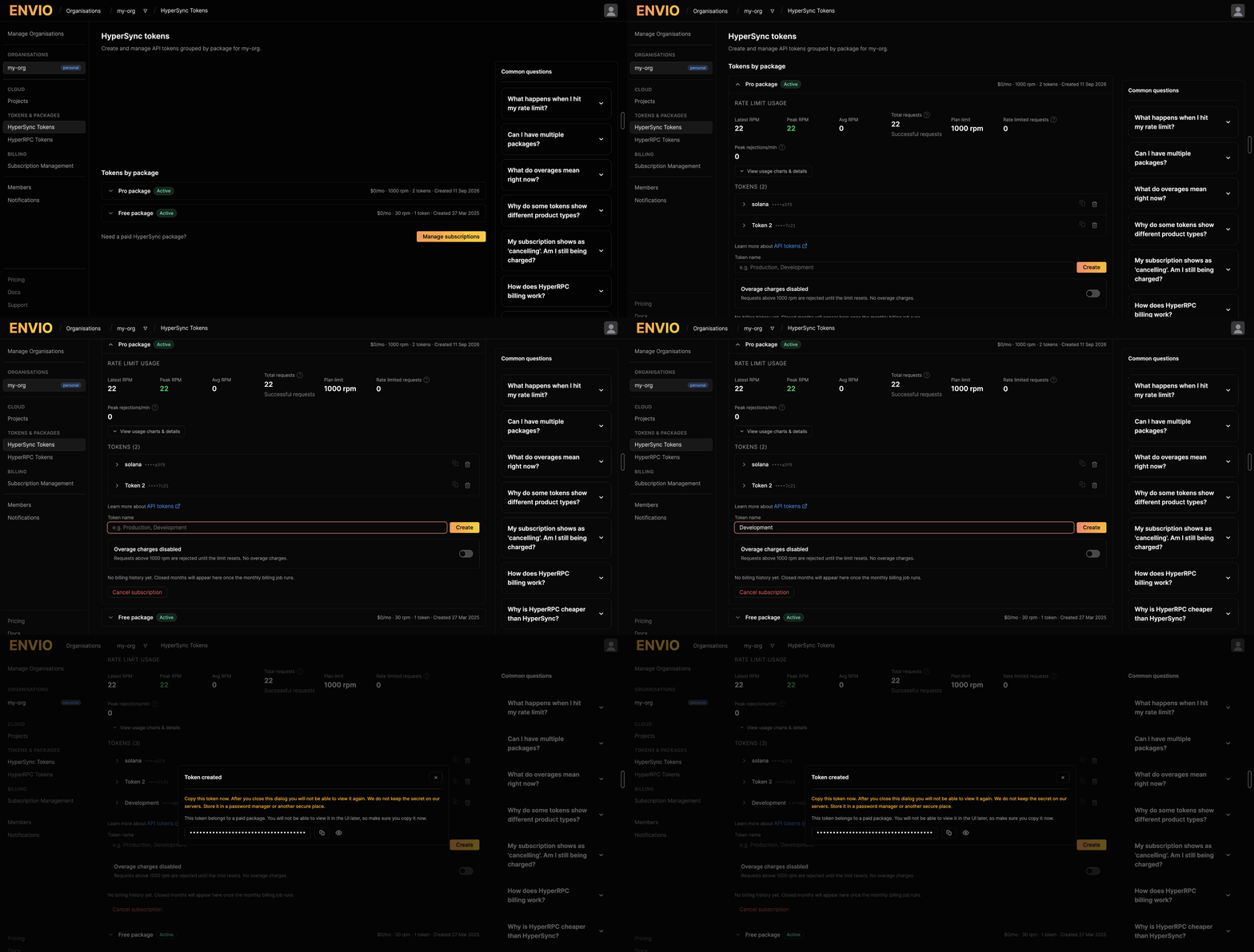
Envio does not keep the secret on its servers. For a token in a paid package, the Token created window is the only place you can copy it. After you close it, the list only shows the last four characters, and if you lose the token you need to delete it with the bin icon and create a new one. A token in a free package can be revealed and copied again from the list.
Token limits and product access
Personal accounts get one free token. If the Token name field says Token limit reached, the package has used all its tokens. Use the one you have, delete it and create a new one, or click Manage subscriptions to add a paid package.
Tokens in new paid packages work for one product, HyperSync or HyperRPC. Tokens created before the billing system launched work for both.
Adding the token to your project
For HyperIndex, put the token in the .env file at the root of your project. HyperIndex reads it from the ENVIO_API_TOKEN variable.
ENVIO_API_TOKEN=your_token_here
For HyperSync client scripts, the examples in Using the token in code read the same ENVIO_API_TOKEN variable. Export it in your shell, or load your .env file with your usual tool.
Letting envio init add it for you
If you give envio init a token, it writes it into the new project's .env file. Pass it with the envio init option --api-token, or set ENVIO_API_TOKEN in your shell first. This suits scripted or agent-driven setups.
ENVIO_API_TOKEN=your_token_here pnpx envio init template \
  --template erc20 --language typescript \
  --name my-indexer --directory my-indexer
The .env file it creates looks like this.
# To create or update a token visit https://envio.dev/app/api-tokens
ENVIO_API_TOKEN="your_token_here"
Using the token in code
Pass the token when you create a HyperSync client.
- TypeScript/JavaScript
- Python
- Rust
const client = new HypersyncClient({
  url: "https://eth.hypersync.xyz",
  apiToken: process.env.ENVIO_API_TOKEN!,
});
import os
import hypersync

client = hypersync.HypersyncClient(hypersync.ClientConfig(
    url="https://eth.hypersync.xyz",
    api_token=os.environ.get("ENVIO_API_TOKEN")
))
let client = Client::new(ClientConfig {
    url: "https://eth.hypersync.xyz".to_string(),
    api_token: std::env::var("ENVIO_API_TOKEN").expect("ENVIO_API_TOKEN must be set"),
    ..Default::default()
}).unwrap();
Understanding usage
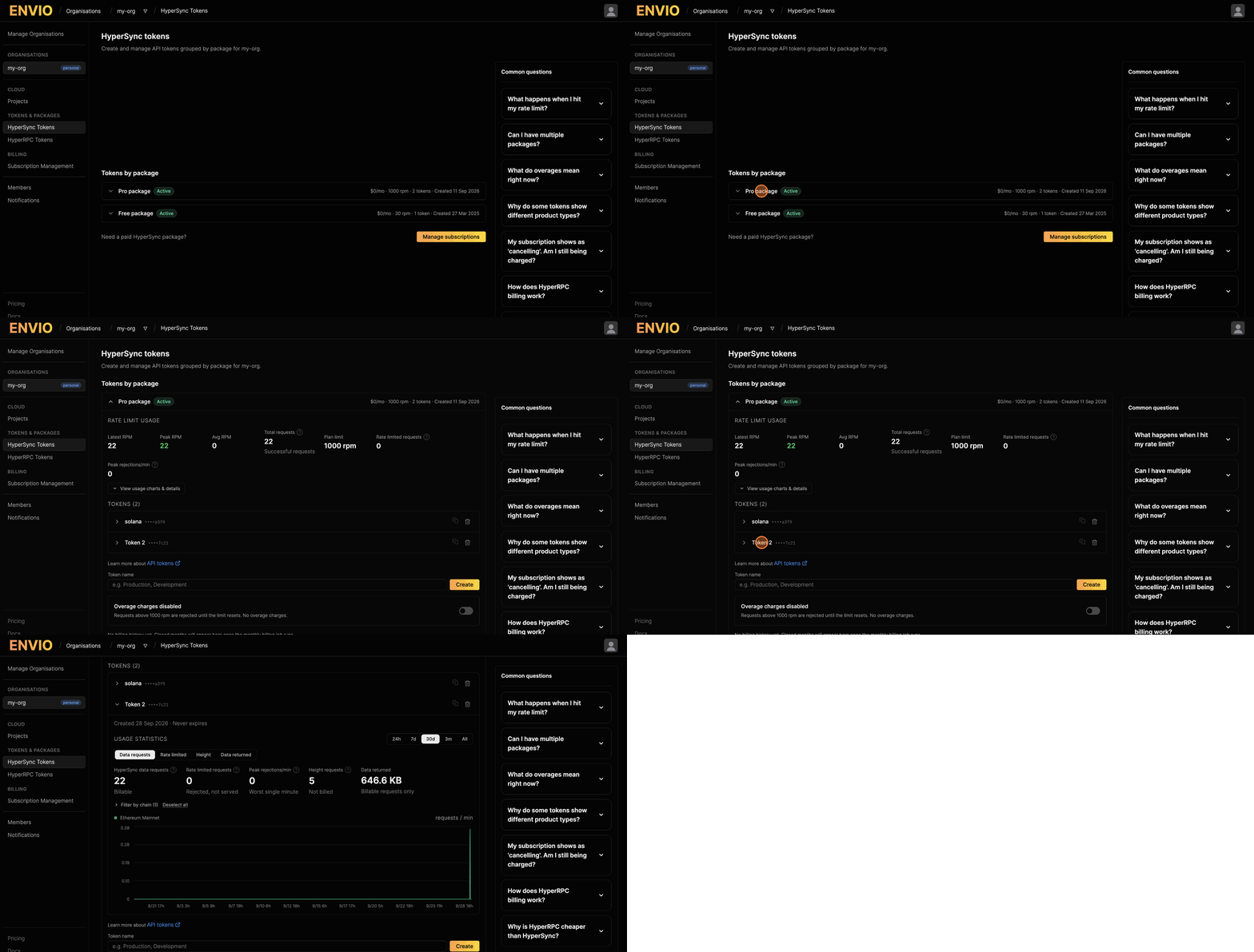
On the HyperSync tokens page, expand a package to see its rate limit usage. Click a token's row to see usage statistics for that token.
Rate limits
The limits below apply to HyperSync.
How is the rate limit applied?
Each token has a budget per 60-second window. The budget is shared across chains, so requests to eth.hypersync.xyz and base.hypersync.xyz with the same token draw from the same budget.
The rate limit caps how fast you can query, not how much you can query in a month.
What limit does my plan have?
Each plan has its own rate limit. See HyperSync pricing for the current limits and overage options.
What happens when I hit the limit?
The server responds with HTTP 429 until the window resets. When streaming, the HyperSync clients wait for the reset and retry, so a stream slows down rather than failing.
Successful and 429 responses carry x-ratelimit-* headers with your remaining budget and seconds until reset. The budget is counted in units rather than requests. See Inspecting rate limits from your code to read them.
How do I make fewer requests?
Lower concurrency in your stream config so fewer requests run in parallel. See Stream Config & Tuning. For more headroom, move to a plan with a higher limit.
Common errors
| Error | Cause | Fix |
|---|---|---|
HTTP 401, Your token is malformed | No token was sent, or the token is not in the expected format | Create a token in the Envio Dashboard and pass it as shown in Using the token in code |
HTTP 403, Your token is unknown or pending activation | The token does not exist or is not active | Check the token was copied correctly and is still listed and active in the Envio Dashboard |
HTTP 403, Your token does not have access to this product | The token does not have access to the product you called, for example HyperRPC | Check which package the token belongs to in the Envio Dashboard or see HyperRPC pricing |
| HTTP 429 | The token used its budget for the current window | Wait for the window to reset, lower concurrency, or move to a higher plan |
Security best practices
- Never commit tokens to git. Keep them in environment variables or a
.envfile, not in your code. - Add
.envto your.gitignoreso the token never gets committed by accident. - Rotate tokens now and then. Create a new token, switch your apps over, then delete the old one.
- Share tokens only with people who need them.