How to Track Native ETH Transfers Using Envio's HyperSync
 Nikhil Bhintade
 Jordyn Laurier
- Tracking native ETH transfers onchain requires parsing traces rather than event logs, which is slow over standard RPC.
- HyperSync exposes trace filtering directly, letting you stream native transfers by filtering on
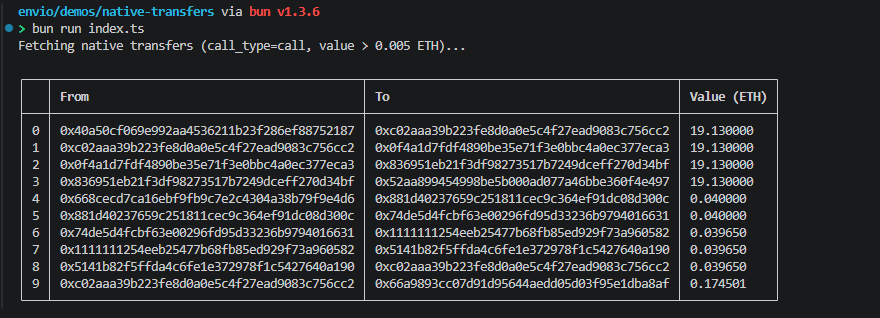
call_type=calland applying a value threshold to the results. - Full working example uses the Node.js client in a Bun project, streaming results until 10 transfers above 0.005 ETH are collected.
- Trace support is available on Ethereum, Base, and Gnosis, with access on request.
Tracking native token transfers onchain is trickier than ERC-20 transfers. There's no event log to index, so you have to dig through traces. With a standard RPC node, that means calling trace_block (or debug_traceBlockByNumber on Geth) and iterating every trace in every block, which is slow.
HyperSync gives you a faster alternative: a data retrieval layer with native trace filtering.
Prerequisites
We are going to use Bun for this article, so make sure you have it installed. If you want to use another runtime that supports TypeScript, you can do that too.
You will also need an Envio API token to access HyperSync. If you don't have one, go to envio.dev/app/api-tokens to create one. Step-by-step instructions are at docs.envio.dev/docs/HyperSync/api-tokens.
HyperSync & Queries
HyperSync is optimized for data retrieval, not consensus, so it's far faster than RPC nodes. To fetch data, you send a query describing what you want and HyperSync returns only that data.
A typical query in the Node.js client looks like this:
{
  "fromBlock": 0,
  "transactions": [
    { "from": ["0x5a830d7a5149b2f1a2e72d15cd51b84379ee81e5"] },
    { "to": ["0x5a830d7a5149b2f1a2e72d15cd51b84379ee81e5"] }
  ],
  "fieldSelection": {
    "transaction": ["BlockNumber", "Hash", "From", "To", "Value"]
  }
}
Every query has three main parts: fromBlock, one or more selections (transactions, blocks, logs, or traces), and fieldSelection. See the full query reference for all available options.
Filtering for Native Transfers
Most native ETH transfers show up in traces where call_type is call, not staticcall or delegatecall. Contract creations and self-destructs can also move ETH, but this guide sticks to calls. In the Node.js client this field is written callType. Filtering on it is narrower than filtering on the trace type, because type: ["call"] would also return delegatecall and staticcall traces, which don't move ETH of their own.
Building the Fetcher
Setup
Create a new Bun project and install the HyperSync client:
bun init -y && bun install @envio-dev/hypersync-client
Add your API token to a .env file. If you don't have one, generate it at envio.dev/app/api-tokens.
ENVIO_API_TOKEN=your_token_here
Note: HyperSync trace support is currently available on Ethereum, Base, and Gnosis, with access on request. Ask in Discord if you need trace support for other chains.
Imports & Helpers
import { HypersyncClient, type TraceField } from "@envio-dev/hypersync-client";
We'll filter out dust transfers using a minimum threshold and format values as human-readable ETH:
const THRESHOLD_WEI = BigInt("5000000000000000"); // 0.005 ETH
const WEI_PER_ETH = BigInt("1000000000000000000"); // 1 ETH
const DECIMALS = 6;

function weiToEth(wei: bigint): string {
  const whole = wei / WEI_PER_ETH;
  const remainder = wei % WEI_PER_ETH;
  const remainderStr = remainder.toString().padStart(18, "0").slice(0, DECIMALS);
  return `${whole}.${remainderStr}`;
}
Creating the Client
Use the Ethereum traces endpoint:
const client = new HypersyncClient({
  url: "https://eth-traces.hypersync.xyz",
  apiToken: process.env.ENVIO_API_TOKEN!,
});
Query
Request only call type traces and select the fields we care about:
const query = {
  fromBlock: 22000000,
  traces: [
    {
      callType: ["call"],
    },
  ],
  fieldSelection: {
    trace: ["From", "To", "Value", "CallType", "BlockNumber"] as TraceField[],
  },
};
Streaming Results
The HyperSync client can get a single response, stream continuously, or collect a whole range. We'll stream and stop once we've collected 10 transfers above the threshold:
console.log("Fetching native transfers (call_type=call, value > 0.005 ETH)...\n");

const results: { from: string; to: string; valueEth: string }[] = [];

const stream = await client.stream(query, {});

outer: while (true) {
  const res = await stream.recv();

  if (res === null) break; // stream exhausted

  if (res.data?.traces) {
    for (const trace of res.data.traces) {
      if (trace.value === undefined || trace.value === null) continue;
      if (trace.value <= THRESHOLD_WEI) continue;

      results.push({
        from: trace.from ?? "unknown",
        to: trace.to ?? "unknown",
        valueEth: weiToEth(trace.value),
      });

      if (results.length >= 10) break outer;
    }
  }
}

await stream.close();

if (results.length === 0) {
  console.log("No results found.");
} else {
  console.table(
    results.map((r) => ({
      From: r.from,
      To: r.to,
      "Value (ETH)": r.valueEth,
    }))
  );
}
Run it with:
bun run index.ts
Next Steps
We only used callType as a filter here. From this starting point you can track a specific wallet by adding from or to address filters to the trace selection, narrow further using other TraceSelection fields like sighash or type, or switch the endpoint to another HyperSync trace-enabled network to run the same query across chains. On Gnosis the native token is xDAI, so adjust the threshold and labels there.
To decode what each call in a trace did, not just the ETH it moved, follow the decoding transaction traces tutorial. See the HyperSync query reference for the full TraceSelection schema and field list.
Frequently Asked Questions
What Is HyperSync's Traces Query?
HyperSync's traces query exposes EVM execution traces (call, create, suicide, reward) directly, rather than just contract event logs. This makes it possible to track operations that don't emit events, like native ETH transfers, by filtering on call_type and checking each trace's value. The traces feature is currently available on Ethereum, Base, and Gnosis, with access on request. Other queries (logs, transactions, blocks) work across 81+ EVM chains with official client libraries for Node.js, Python, and Rust, plus a community-maintained Go client.
Why Can't I Track Native ETH Transfers Using Event Logs?
Native ETH transfers don't emit events. The ERC-20 Transfer event is a standard contract event, but native ETH moves at the protocol level and only shows up in transaction traces. To track them, you have to query traces directly.
What's the Difference Between call_type and type When Filtering Traces?
type is the trace type (call, create, suicide, reward). call_type is the sub-type of a call trace (call, delegatecall, staticcall, and so on). Most native ETH transfers happen where call_type is call, so filtering on call_type directly is narrower than filtering on type, which also returns delegatecall and staticcall traces. Contract creations and self-destructs can also move ETH, so add those trace types if you need every movement.
Which Chains Support Trace Queries on HyperSync?
Trace support is currently available on Ethereum, Base, and Gnosis, with access on request. The trace chains are listed on supported networks. If you need trace support on another chain, ask in Discord.
How Fast Is HyperSync Compared to RPC for Trace Queries?
HyperSync is up to 2000x faster than standard JSON-RPC for data retrieval workloads. Trace queries are where RPC hurts most, since methods like trace_block usually re-execute every transaction in the block to produce their output.
Can I Use This Approach for ERC-20 Transfers Too?
Yes, but for ERC-20 you'd query logs instead of traces since ERC-20 contracts emit a Transfer event. Use the logs filter with the Transfer event signature as topic0. See the HyperSync query reference for details.
Build With Envio
Envio is a real-time multichain blockchain indexer that turns onchain events into a queryable GraphQL API. If you are building onchain and need indexing that keeps up with your chain, check out the docs, run the benchmarks yourself, or come talk to us about your data needs. Stay tuned for more updates by subscribing to our newsletter, following us on X, or hopping into our Discord. Subscribe to our newsletter 💌
Website | X | Discord | Telegram | GitHub | YouTube | Reddit