HyperSync Quickstart
The HyperSync Query Builder lets you construct and run queries directly in your browser — no install, no code required. It's the fastest way to get familiar with HyperSync and see what's possible.
Get up and running with HyperSync in minutes. This guide will help you start accessing blockchain data at unprecedented speeds with minimal setup. For a conceptual overview before you dive in, see What is HyperSync?.
Quickest Start: Try LogTUI
Want to see HyperSync in action with zero setup? Try LogTUI, a terminal-based blockchain event viewer:
# Monitor Aave events on Arbitrum (no installation needed)
pnpx logtui aave arbitrum
Clone the Quickstart Repository
The fastest way to get started is to clone our minimal example repository:
git clone https://github.com/enviodev/hypersync-quickstart.git
cd hypersync-quickstart
This repository contains everything you need to start streaming blockchain data using HyperSync.
Install Dependencies
# Using pnpm (recommended)
pnpm install
Choose Your Adventure
The repository includes three different script options, all of which retrieve Uniswap V3 events from Ethereum mainnet:
# Run minimal version (recommended for beginners)
node run-simple.js

# Run full version with progress bar
node run.js

# Run version with terminal UI
node run-tui.js
That's it! You're now streaming data directly from Ethereum mainnet through HyperSync! (TUI version below)
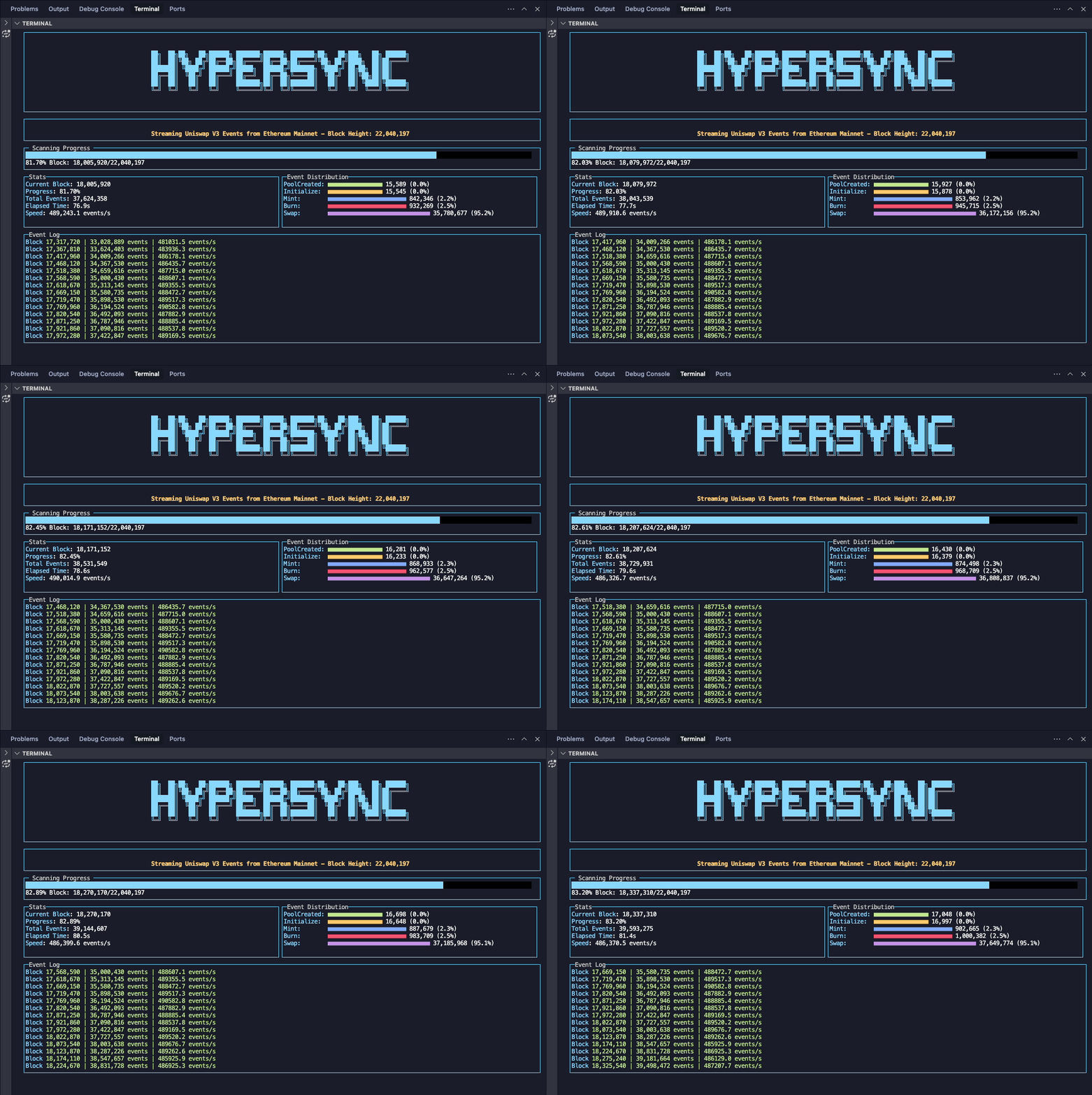
Understanding the Code
Let's look at the core concepts in the example code:
1. Initialize the Client
import { HypersyncClient } from "@envio-dev/hypersync-client";

// Initialize Hypersync client
const client = new HypersyncClient({
  url: "https://eth.hypersync.xyz", // Change this URL for different networks
  apiToken: process.env.ENVIO_API_TOKEN!,
});
Note: To connect to different networks, see the Supported Networks page for a complete list of available URLs.
2. Build Your Query
The heart of HyperSync is the query object, which defines what data you want to retrieve:
let query = {
  fromBlock: 0, // Start block (0 = genesis)
  logs: [
    // Filter for specific events
    {
      topics: [topic0_list], // Event signatures we're interested in
    },
  ],
  fieldSelection: {
    // Only return fields we need
    log: [
      "Data",
      "Address",
      "Topic0",
      "Topic1",
      "Topic2",
      "Topic3",
    ],
  },
};
3. Stream and Process Results
// Start streaming events
const stream = await client.stream(query, {});
let totalEvents = 0;

while (true) {
  const res = await stream.recv();

  // Exit when the stream reaches the end
  if (res === null) break;

  // Process results
  if (res.data && res.data.logs) {
    // Do something with the logs
    totalEvents += res.data.logs.length;
  }

  // Update starting block for next batch
  if (res.nextBlock) {
    query.fromBlock = res.nextBlock;
  }
}
Key Concepts for Building Queries
Filtering Data
HyperSync lets you filter blockchain data in several ways:
- Log filters: Find specific events by contract address and event signature
- Transaction filters: Filter by sender/receiver addresses, method signatures, etc.
- Trace filters: Access internal transactions and state changes (only supported on select networks like Ethereum Mainnet)
- Block filters: Get data from specific block ranges
Field Selection
One of HyperSync's most powerful features is the ability to retrieve only the fields you need:
fieldSelection: {
  // Block fields
  block: ["Number", "Timestamp"],

  // Log fields
  log: ["Address", "Topic0", "Data"],

  // Transaction fields
  transaction: ["From", "To", "Value"],
}
This selective approach dramatically reduces unnecessary data transfer and improves performance.
Join Modes
HyperSync allows you to control how related data is joined:
- JoinNothing: Return only exact matches
- JoinAll: Return matches plus all related objects
- Default: Return a reasonable set of related objects
Examples
Finding Uniswap V3 Events
This example (from the quickstart repo) streams all Uniswap V3 events from the beginning of Ethereum:
import { keccak256, toHex } from "viem";
import { HypersyncClient } from "@envio-dev/hypersync-client";

// Define Uniswap V3 event signatures
const event_signatures = [
  "PoolCreated(address,address,uint24,int24,address)",
  "Burn(address,int24,int24,uint128,uint256,uint256)",
  "Initialize(uint160,int24)",
  "Mint(address,address,int24,int24,uint128,uint256,uint256)",
  "Swap(address,address,int256,int256,uint160,uint128,int24)",
];

// Create topic0 hashes from event signatures
const topic0_list = event_signatures.map((sig) => keccak256(toHex(sig)));

// Initialize Hypersync client
const client = new HypersyncClient({
  url: "https://eth.hypersync.xyz",
  apiToken: process.env.ENVIO_API_TOKEN!,
});

// Define query for Uniswap V3 events
let query = {
  fromBlock: 0,
  logs: [
    {
      topics: [topic0_list],
    },
  ],
  fieldSelection: {
    log: [
      "Data",
      "Address",
      "Topic0",
      "Topic1",
      "Topic2",
      "Topic3",
    ],
  },
};

const main = async () => {
  console.log("Starting Uniswap V3 event scan...");
  const stream = await client.stream(query, {});

  // Process stream...
};

main();
Supported Networks
HyperSync supports 81+ EVM-compatible networks. You can change networks by simply changing the client URL:
// Ethereum Mainnet
const ethClient = new HypersyncClient({
  url: "https://eth.hypersync.xyz",
  apiToken: process.env.ENVIO_API_TOKEN!,
});

// Arbitrum
const arbitrumClient = new HypersyncClient({
  url: "https://arbitrum.hypersync.xyz",
  apiToken: process.env.ENVIO_API_TOKEN!,
});

// Base
const baseClient = new HypersyncClient({
  url: "https://base.hypersync.xyz",
  apiToken: process.env.ENVIO_API_TOKEN!,
});
See the Supported Networks page for a complete list.
Using LogTUI
This quickstart repository powers LogTUI, a terminal-based blockchain event viewer built on HyperSync. LogTUI lets you monitor events from popular protocols across multiple chains with zero configuration.
Try it with a single command:
# Monitor Uniswap events on unichain
pnpx logtui uniswap-v4 unichain

# Monitor Aave events on Arbitrum
pnpx logtui aave arbitrum

# See all available options
pnpx logtui --help
LogTUI supports scanning historically for any events across all networks supported by HyperSync.
Next Steps
You're now ready to build with HyperSync! Here are some resources for diving deeper:
- Client Libraries - Explore language-specific clients
- Query Reference - Learn advanced query techniques
- Build queries visually - Use our Intuitive Query Builder
- curl Examples - Test queries directly in your terminal
- Complete Getting Started Guide - More comprehensive guidance
API Token
An API token is required to use HyperSync. Get an API token and set it as an environment variable:
export ENVIO_API_TOKEN="your-api-token-here"
Congratulations! You've taken your first steps with HyperSync, bringing ultra-fast blockchain data access to your applications. Happy building!