Getting Price Data in Your Indexer
Introduction
Many blockchain applications require price data to calculate values such as:
- Historical token transfer values in USD
- Total value locked (TVL) in DeFi protocols over time
- Portfolio valuations at specific points in time
This tutorial explores three different approaches to incorporating price data into your Envio indexer, using a real-world example of tracking ETH deposits into a Uniswap V3 liquidity pool on the Blast blockchain.
TL;DR: The complete code for this tutorial is available in this GitHub repository.
What You'll Learn
In this tutorial, you'll:
- Compare three different methods for accessing token price data
- Analyze the tradeoffs between accuracy, decentralization, and performance
- Implement a multi-source price feed in an Envio indexer
- Build a practical example indexing Uniswap V3 liquidity events with price context
Price Data Methods Compared
There are three primary methods to access price data within your indexer:
| Method | Description | Speed | Accuracy | Decentralization |
|---|---|---|---|---|
| Oracles | On-chain price feeds (e.g., API3, Chainlink) | Fast | Medium | Medium |
| DEX Pools | Swap events from decentralized exchanges | Fast | Medium-High | High |
| Off-chain APIs | External services (e.g., CoinGecko) | Slow | High | Low |
Let's explore each method in detail.
Method 1: Using Oracle Price Feeds
Oracle networks provide on-chain price data through specialized smart contracts. For this tutorial, we'll use API3 price feeds on Blast.
How Oracles Work
Oracle services like API3 maintain a network of data providers that push price updates to on-chain contracts. These updates typically occur:
- At regular time intervals
- When price deviations exceed a predefined threshold (e.g., 1%)
- When manually triggered by network participants
Finding the Right Oracle Feed
To locate the ETH/USD price feed using API3 on Blast:
-
Identify the API3 contract address:
0x709944a48cAf83535e43471680fDA4905FB3920a -
Find the data feed ID for ETH/USD:
- The dAPI name "ETH/USD" as bytes32:
0x4554482f55534400000000000000000000000000000000000000000000000000 - Using the
dapiNameToDataFeedIdfunction, this maps to0x3efb3990846102448c3ee2e47d22f1e5433cd45fa56901abe7ab3ffa054f70b5
- The dAPI name "ETH/USD" as bytes32:
-
Monitor the
UpdatedBeaconSetWithBeaconsevents with this data feed ID to get price updates
Note: API3 later moved ETH/USD on Blast to new data feed IDs, and stopped publishing it on Blast in May 2026. This feed ID stops updating after block 11,692,092 (November 2024), so the oracle price stays flat after that block. The same approach works on any chain where an API3 feed is live: look up the current data feed ID with
dapiNameToDataFeedIdbefore you index.
Oracle Advantages and Limitations
Advantages:
- Fast indexing (no external API calls required)
- Moderate decentralization
- Generally reliable data
Limitations:
- Updates only on significant price changes
- Limited token coverage (mainly high-liquidity pairs)
- Minor accuracy tradeoffs
Method 2: Using DEX Pool Swap Events
Decentralized exchanges like Uniswap provide price data through swap events. We'll use the USDB/WETH pool on Blast to derive ETH pricing.
Locating the Right DEX Pool
First, we need to find the specific Uniswap V3 pool for USDB/WETH:
import { createPublicClient, http, parseAbi, getContract } from "viem";
import { blast } from "viem/chains";

const usdb = "0x4300000000000000000000000000000000000003";
const weth = "0x4300000000000000000000000000000000000004";
const factoryAddress = "0x792edAdE80af5fC680d96a2eD80A44247D2Cf6Fd";
const factoryAbi = parseAbi([
  "function getPool( address tokenA, address tokenB, uint24 fee ) external view returns (address pool)",
]);

const providerUrl = "https://rpc.blast.io";
const poolBips = 3000; // 0.3%. This is measured in hundredths of a bip

const client = createPublicClient({
  chain: blast,
  transport: http(providerUrl),
});

const factoryContract = getContract({
  abi: factoryAbi,
  address: factoryAddress,
  client: client,
});

(async () => {
  const poolAddress = await factoryContract.read.getPool([
    usdb,
    weth,
    poolBips,
  ]);
  console.log(poolAddress);
})();
Tip: You can also manually find the pool address using the
getPoolfunction on a block explorer.
Running this code reveals the USDB/WETH pool is at 0xf52B4b69123CbcF07798AE8265642793b2E8990C.
Getting Price Data From Swap Events
Uniswap V3 emits Swap events containing price information in the sqrtPriceX96 field. To convert this to a price, we'll use a formula in our event handler.
DEX Advantages and Limitations
Advantages:
- Very decentralized
- High update frequency
- Wide token coverage
Limitations:
- Susceptible to price impact and manipulation (especially in low-liquidity pools)
- Requires extra calculations to derive prices
- May require multiple pools for cross-pair calculations
Method 3: Using Off-chain APIs
External price APIs like CoinGecko provide comprehensive token price data but require HTTP calls from your indexer.
Making API Requests
Here's an effect that fetches historical ETH prices from CoinGecko. Save it as src/handlers/request.ts:
import { createEffect, S } from "envio";

const COIN_GECKO_API_KEY = process.env.COIN_GECKO_API_KEY;

// Convert a unix timestamp to the dd-mm-yyyy date format CoinGecko expects
export function unixToDate(unix: number): string {
  return new Date(unix * 1000)
    .toISOString()
    .slice(0, 10)
    .split("-")
    .reverse()
    .join("-");
}

export const getEthPrice = createEffect(
  {
    name: "getEthPrice",
    input: S.string, // date as dd-mm-yyyy
    output: S.nullable(S.number),
    rateLimit: {
      calls: 5,
      per: "minute",
    },
    cache: true,
  },
  async ({ input: date, context }) => {
    try {
      const res = await fetch(
        `https://api.coingecko.com/api/v3/coins/ethereum/history?date=${date}&localization=false`,
        {
          headers: {
            accept: "application/json",
            ...(COIN_GECKO_API_KEY
              ? { "x-cg-demo-api-key": COIN_GECKO_API_KEY }
              : {}),
          },
        }
      );
      const data: any = await res.json();
      const usdPrice = data?.market_data?.current_price?.usd;
      if (typeof usdPrice !== "number") {
        throw new Error(`HTTP ${res.status}: ${JSON.stringify(data).slice(0, 200)}`);
      }
      context.log.info(`ETH price on ${date}: ${usdPrice}`);
      return usdPrice;
    } catch (err) {
      context.log.error(`Failed to fetch ETH price for ${date}: ${err}`);
      // Don't cache failed responses so they are retried on the next run
      context.cache = false;
      return null;
    }
  }
);
The call is wrapped in the Effect API, so each date is fetched once and cached, and the rate limit keeps you inside CoinGecko's free tier.
Add your CoinGecko key to .env as COIN_GECKO_API_KEY=<your key>.
Note: The free CoinGecko API only provides daily price data (at 00:00 UTC), not block-by-block precision, and only returns history for the past 365 days. For older blocks or production use, consider a paid API with more granular historical data.
Off-chain API Advantages and Limitations
Advantages:
- Highest accuracy (with paid APIs)
- Most comprehensive token coverage
- No susceptibility to on-chain manipulation
Limitations:
- Significantly slows indexing speed due to API calls
- Centralized data source
- May require paid subscriptions for full functionality
Building a Multi-Source Price Feed Indexer
Now let's build an indexer that compares all three methods when tracking Uniswap V3 liquidity pool deposits.
Step 1: Initialize Your Indexer
Create a new Envio indexer project from the Greeter template, then remove the template's Greeter handler and test, since this tutorial replaces them. The init command needs an Envio API token, so create one at envio.dev/app/api-tokens and export it first, or pass --api-token <token>.
export ENVIO_API_TOKEN=your_token_here
pnpx envio init template -t greeter -l typescript -n envio-indexer -d envio-indexer
cd envio-indexer
rm src/handlers/Greeter.ts src/indexer.test.ts
Step 2: Configure Your Indexer
Edit your config.yaml file to track both the API3 oracle and the Uniswap V3 pool:
# yaml-language-server: $schema=./node_modules/envio/evm.schema.json
name: envio-indexer
chains:
  - id: 81457
    start_block: 11000000
    contracts:
      - name: Api3ServerV1
        address:
          - "0x709944a48cAf83535e43471680fDA4905FB3920a"
        events:
          - event: UpdatedBeaconSetWithBeacons(bytes32 indexed beaconSetId, int224 value, uint32 timestamp)
      - name: UniswapV3Pool
        address:
          - "0xf52B4b69123CbcF07798AE8265642793b2E8990C"
        events:
          - event: Swap(address indexed sender, address indexed recipient, int256 amount0, int256 amount1, uint160 sqrtPriceX96, uint128 liquidity, int24 tick)
          - event: Mint(address sender, address indexed owner, int24 indexed tickLower, int24 indexed tickUpper, uint128 amount, uint256 amount0, uint256 amount1)
            field_selection:
              transaction_fields:
                - "hash"
Important: The
field_selectionsection is needed to include transaction hashes in your indexed data.
Step 3: Define Your Schema
Create a schema that captures price data from all three sources:
type OraclePoolPrice {
  id: ID!
  value: BigInt!
  timestamp: BigInt!
  block: Int!
}

type UniswapV3PoolPrice {
  id: ID!
  sqrtPriceX96: BigInt!
  timestamp: Int!
  block: Int!
}

type EthDeposited {
  id: ID!
  timestamp: Int!
  block: Int!
  oraclePrice: Float!
  poolPrice: Float!
  offChainPrice: Float!
  offchainOracleDiff: Float!
  depositedPool: Float!
  depositedOffchain: Float!
  depositedOracle: Float!
  txHash: String!
}
Step 4: Implement Event Handlers
Create event handlers to process data from all three sources. Save them as src/handlers/EventHandlers.ts:
import { indexer, type Entity } from "envio";
import { getEthPrice, unixToDate } from "./request";

let latestOraclePrice = 0;
let latestPoolPrice = 0;

indexer.onEvent(
  { contract: "Api3ServerV1", event: "UpdatedBeaconSetWithBeacons" },
  async ({ event, context }) => {
    // Filter out the beacon set for the ETH/USD price
    if (
      event.params.beaconSetId !=
      "0x3efb3990846102448c3ee2e47d22f1e5433cd45fa56901abe7ab3ffa054f70b5"
    ) {
      return;
    }

    const entity: Entity<"OraclePoolPrice"> = {
      id: `${event.chainId}-${event.block.number}-${event.logIndex}`,
      value: event.params.value,
      timestamp: event.params.timestamp,
      block: event.block.number,
    };

    latestOraclePrice = Number(event.params.value) / Number(10 ** 18);

    context.OraclePoolPrice.set(entity);
  },
);

indexer.onEvent(
  { contract: "UniswapV3Pool", event: "Swap" },
  async ({ event, context }) => {
    const entity: Entity<"UniswapV3PoolPrice"> = {
      id: `${event.chainId}-${event.block.number}-${event.logIndex}`,
      sqrtPriceX96: event.params.sqrtPriceX96,
      timestamp: event.block.timestamp,
      block: event.block.number,
    };

    latestPoolPrice = Number(
      (2n ** 192n) /
        (BigInt(event.params.sqrtPriceX96) * BigInt(event.params.sqrtPriceX96))
    );

    context.UniswapV3PoolPrice.set(entity);
  },
);

indexer.onEvent(
  { contract: "UniswapV3Pool", event: "Mint" },
  async ({ event, context }) => {
    const offChainPrice =
      (await context.effect(getEthPrice, unixToDate(event.block.timestamp))) ??
      NaN;

    const ethDepositedUsdPool =
      (latestPoolPrice * Number(event.params.amount1)) / 10 ** 18;
    const ethDepositedUsdOffchain =
      (offChainPrice * Number(event.params.amount1)) / 10 ** 18;
    const ethDepositedUsdOracle =
      (latestOraclePrice * Number(event.params.amount1)) / 10 ** 18;

    const ethDeposited: Entity<"EthDeposited"> = {
      id: `${event.chainId}-${event.block.number}-${event.logIndex}`,
      timestamp: event.block.timestamp,
      block: event.block.number,
      oraclePrice: round(latestOraclePrice),
      poolPrice: round(latestPoolPrice),
      offChainPrice: round(offChainPrice),
      depositedPool: round(ethDepositedUsdPool),
      depositedOffchain: round(ethDepositedUsdOffchain),
      depositedOracle: round(ethDepositedUsdOracle),
      offchainOracleDiff: round(
        ((ethDepositedUsdOffchain - ethDepositedUsdOracle) /
          ethDepositedUsdOffchain) *
          100
      ),
      txHash: event.transaction.hash,
    };

    context.EthDeposited.set(ethDeposited);
  },
);

function round(value: number) {
  return Math.round(value * 100) / 100;
}
Step 5: Run Your Indexer
Start your indexer with:
pnpm dev
This will begin indexing data from block 11,000,000 on Blast.
Step 6: Analyze the Results
After running your indexer, you can query the data in Hasura to compare the three price data sources:
query ComparePrices {
  EthDeposited(order_by: { block: desc }, limit: 10) {
    block
    timestamp
    oraclePrice
    poolPrice
    offChainPrice
    depositedPool
    depositedOffchain
    depositedOracle
    offchainOracleDiff
    txHash
  }
}
Results Analysis
When comparing our three price data sources in our original run, we found:
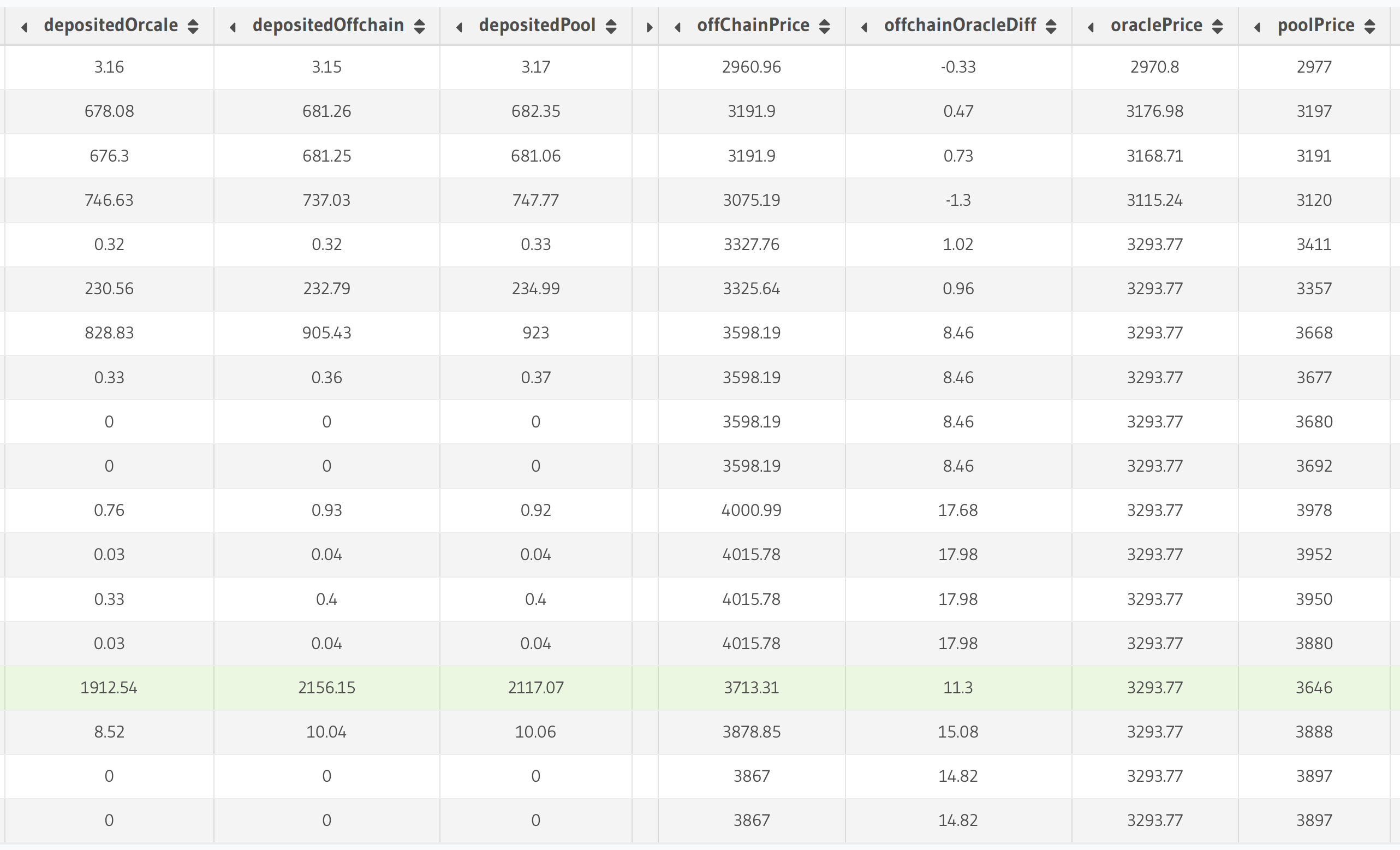
Looking at the offchainOracleDiff column, we can see that oracle and off-chain prices typically align closely but can deviate by as much as 17.98% in some cases.
For the highlighted transaction (0xe7e79ddf29ed2f0ea8cb5bb4ffdab1ea23d0a3a0a57cacfa875f0d15768ba37d), we can compare our calculated values:
- Actual value (from block explorer): $2,358.27
- DEX pool value (
depositedPool): $2,117.07 - Off-chain API value (
depositedOffchain): $2,156.15
This demonstrates that even the most accurate methods have limitations.
Conclusion: Choosing the Right Method
Based on our analysis, here are some recommendations for choosing a price data method:
Use Oracle or DEX Pools when:
- Indexing speed is critical
- Absolute precision isn't required
- You're working with high-liquidity tokens
Use Off-chain APIs when:
- Price accuracy is paramount
- Indexing speed is less important
- You can implement effective caching
For maximum accuracy while maintaining performance:
- Combine multiple methods and aggregate results
- Use high-volume DEX pools on major chains
- Cache API results to avoid redundant calls
Next Steps
To further enhance your price data indexing:
- Implement caching for off-chain API calls
- Cross-reference multiple DEX pools for better accuracy
- Consider time-weighted average prices (TWAP) instead of spot prices
- Use multichain indexing to access higher-liquidity pools on major chains
By carefully choosing and implementing the right price data strategy, you can build robust indexers that provide accurate financial data for your blockchain applications.