How to Build a HyperEVM Indexer on Hyperliquid
 Jordyn Laurier
- HyperEVM is Hyperliquid's EVM, chain ID
999, with public RPChttps://rpc.hyperliquid.xyz/evm. It is the only part of Hyperliquid that produces EVM blocks and logs, so it is the part an EVM indexer can read. Envio serves it through HyperSync athttps://hyperliquid.hypersync.xyz. - Everything HyperEVM sends to HyperCore leaves a log, as CoreWriter
RawActionevents on0x3333…3333, HYPEReceivedevents on0x2222…2222andTransferevents into each token's system address. Credits coming back from HyperCore arrive as system transactions with no log on the official RPC or HyperSync, and across 200 sampled blocks HyperSync returned none of the 37 system transactions the official RPC lists for them. - CoreWriter logged 1,366,060 actions from 7,710 addresses up to block 45,628,967, and its busiest month was 8.3 times its first full month. A log records a request, and HyperCore can still reject the action.
- 57.5% of those actions came from one contract, Circle's CoreDepositWallet for USDC. All of them are
Send asset, and in the 100,000 blocks we decoded, each one forwarded a USDC deposit to the default perps dex. - You can check what HyperCore did with each request. All nine CoreWriter actions in a 50-block sample matched an order status or a ledger entry on Hyperliquid's info endpoint, and the check script shows how.
- Only need your own contract's events? Indexing your own HyperEVM contract takes three short files, with no RPC to configure.
- All the code below is tested, and the numbers are under What the Data Shows. Copy it, clone it from GitHub, or hand the job to your coding agent with our prompt.
If you are building on Hyperliquid, you will probably need data from both of its halves. HyperCore is the exchange, with the order books, margin and matching engine. HyperEVM is the general-purpose EVM beside it, where contracts send HyperCore orders, transfers and staking instructions. We wanted to know exactly how much of that an EVM indexer can see, because the gaps do not raise errors. They leave numbers missing.
One direction is fully visible and the other is not. Everything HyperEVM sends to HyperCore leaves a log. What HyperCore sends back does not, and nothing that happens inside HyperCore shows up at all. So we built an indexer for every action, HYPE transfer and spot token transfer HyperEVM has sent to HyperCore, ran it from genesis to block 45,628,967, and checked the gaps with scripts you can run yourself. More than half of all CoreWriter traffic turned out to come from a single USDC contract.
If you're after HyperCore fills, funding or order book data, that comes from Hyperliquid's own APIs rather than HyperEVM, and the FAQ lists where to get it.
HyperEVM RPC, Chain ID and Explorer
These are the values you need to connect, taken from Hyperliquid's HyperEVM docs, its HyperEVM tools list and Envio's chain page.
| Property | Value |
|---|---|
| HyperSync | https://hyperliquid.hypersync.xyz |
| HyperRPC (read only) | https://hyperliquid.rpc.hypersync.xyz |
| Public RPC (mainnet) | https://rpc.hyperliquid.xyz/evm |
| Public RPC (testnet) | https://rpc.hyperliquid-testnet.xyz/evm |
| Chain ID | 999 (mainnet), 998 (testnet) |
| Gas token | HYPE |
| Explorer | hyperevmscan.io, hyperscan.com |
| Consensus | HyperBFT, shared with HyperCore |
HyperSync and HyperRPC are Envio's endpoints for mainnet, and they are what an indexer points at. The other rows are Hyperliquid's published values.
Both Envio endpoints also answer on chain ID, as https://999.hypersync.xyz and https://999.rpc.hypersync.xyz. The testnet is not a HyperSync network, so indexing chain 998 means giving HyperIndex an RPC endpoint instead, as in this tested testnet config. The wallet-facing values are also listed on Chainlist under chain 999.
The public RPC is built for wallets and apps. Hyperliquid's JSON-RPC docs list eth_getLogs as limited to 50 blocks and four topics per request, and only answer state reads such as eth_call and eth_getBalance at the latest block. In our tests the endpoint returned 200-block ranges and rejected a 2,000-block range, saying the maximum is 1,000. The rate limits page caps it at 100 requests a minute per IP address, and the HyperEVM docs say it has no websocket support. Even at 1,000 blocks a request, reading the history to block 45,628,967 would take more than 45,000 requests, over seven hours at that rate. Hyperliquid also publishes raw HyperEVM blocks in an S3 bucket where you pay the transfer costs, as compressed MessagePack files you decode yourself. That's why indexers use a dedicated data source.
HyperRPC is read only. Its supported methods cover eth_getLogs, block reads, transaction reads and receipts, with no eth_call and no way to send transactions, so it sits alongside a normal provider rather than replacing one. It needs an Envio API token with HyperRPC access, added to the end of the URL.
Two details about HyperEVM change how you read its data.
-
HyperEVM and HyperCore share one consensus. Hyperliquid's docs describe HyperEVM as not a separate chain. Contracts can read HyperCore state through read precompiles starting at
0x…0800, but those reads are calls rather than logs, so an indexer built on logs never sees them. -
Blocks come in two sizes. Under the dual-block architecture, Hyperliquid's docs set small blocks to every second with a 3M gas limit and large blocks to every minute with a 30M gas limit, and number both in one increasing sequence. Do not assume a fixed block time. Read
block.timestampwhen you need time. In the blocks we sampled, each big block carried the same timestamp as the small block just before it, so order blocks by number, not by timestamp.
What HyperEVM Can and Cannot See of HyperCore
HyperCore holds Hyperliquid's order books, margin and matching engine. HyperSync indexes HyperEVM, so fills, funding and liquidations that happen inside HyperCore are not in the data an EVM indexer receives. What does reach HyperEVM is the traffic between the two sides, and it is not the same in both directions.
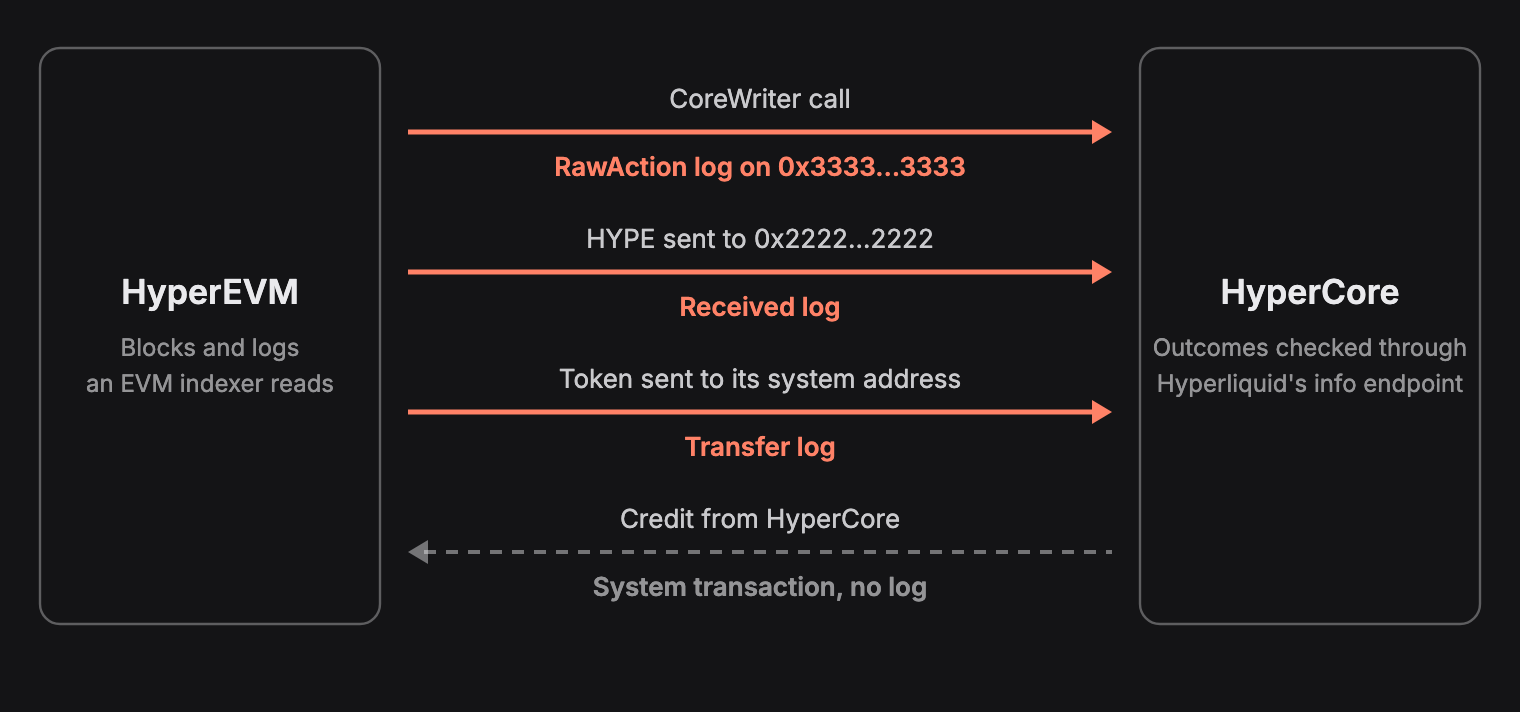
| Direction | How it happens | What HyperEVM records |
|---|---|---|
| EVM to Core, any action | A call to CoreWriter at 0x3333…3333 | A RawAction log |
| EVM to Core, HYPE | HYPE sent as value to 0x2222…2222 | A Received log |
| EVM to Core, spot token | A transfer to the token's system address | A Transfer log |
| Core to EVM | A system transaction | No log |
Mechanics from Hyperliquid's CoreWriter and HyperCore and HyperEVM transfer docs. The last row holds for HyperSync and the official RPC, and is measured below.
CoreWriter Actions
CoreWriter is a system contract at 0x3333333333333333333333333333333333333333 for sending actions from HyperEVM to HyperCore. Each call emits RawAction(address indexed user, bytes data). Hyperliquid's docs set out the payload. The first byte is an encoding version, and only version 1 is supported. The next three bytes are the action ID as a big-endian integer, and the rest is the ABI encoding of that action's fields. The documented actions cover limit orders and cancels, vault transfers, staking and delegation, spot sends, transfers between spot and perps balances, builder fee approvals and more. Order actions and vault transfers are delayed onchain for a few seconds.
A RawAction log records that an action was sent, not that HyperCore carried it out. Hyperliquid's interaction timings page gives the order on an L1 block that produces a HyperEVM block.
- The L1 block is built.
- The HyperEVM block is built.
- Transfers from HyperEVM to HyperCore are processed.
- CoreWriter actions are processed.
The same page says an action is rejected if the sending account doesn't already exist on HyperCore before the HyperEVM block is built, and that transfers from HyperCore to HyperEVM wait for the next HyperEVM block. Confirming execution means asking HyperCore, which is outside what an EVM indexer receives, so every CoreWriter count in this post is a count of actions sent. Checking What Happened on HyperCore shows how to ask.
Here is one payload in full, from block 45,995,118, split into lines so the fields line up.
01 00000d
0000000000000000000000002000000000000000000000000000000000000000
0000000000000000000000000000000000000000000000000000000000000000
00000000000000000000000000000000000000000000000000000000ffffffff
00000000000000000000000000000000000000000000000000000000ffffffff
0000000000000000000000000000000000000000000000000000000000000000
0000000000000000000000000000000000000000000000000000000047c80874
| Field | Value |
|---|---|
| Encoding version | 01, the only supported version |
| Action ID | 00000d, which is 13, Send asset |
destination | 0x2000…0000, the USDC system address |
subAccount | The zero address, so the sender's own balance |
source_dex | ffffffff, which the docs use for spot |
destination_dex | ffffffff, spot again |
token | 0, USDC |
wei | 0x47c80874, or 12.042917 at USDC's 8 HyperCore decimals |
That one is followed all the way onto HyperCore and back under Checking What Happened on HyperCore.
CoreWriter also accepts any bytes, so its logs hold payloads that do not decode as a documented action. The indexer counts those separately rather than dropping them.
HYPE and Spot Tokens
HYPE is HyperEVM's gas token, so it moves to HyperCore as a plain value transfer to 0x2222…2222. That address is a system contract whose receive function emits Received(address indexed user, uint256 amount), with user set to the sender, so contracts and wallets both show up.
Every other spot token has its own system address, 0x20 followed by the token's HyperCore index in big-endian. Token index 200 is 0x20000000000000000000000000000000000000c8. When a HyperCore token is linked to an EVM contract, HyperCore credits the token whenever that contract emits a Transfer into the system address. Hyperliquid's spotMeta info endpoint shows which contract is linked to each index, in the evmContract field. The same field has evm_extra_wei_decimals, which is how many more decimals the token has on HyperEVM than on HyperCore. USDC has 8 on HyperCore and an extra of -2, so it uses 6 on HyperEVM.
When the linked contract is the token's own ERC-20, an ordinary transfer to the system address does the job. USDC is linked to something else. spotMeta links it to 0x6b9e…0a24, which is not the USDC token but Circle's CoreDepositWallet, and the wallet emits the Transfer into the system address itself. An indexer that watches the USDC token for transfers into 0x2000…0000 will miss USDC deposits. What the Data Shows has the details.
Credits From HyperCore Arrive as System Transactions
Hyperliquid's docs describe transfers from HyperCore into HyperEVM as system transactions that call transfer(recipient, amount) on the linked contract from the token's system address. It's easy to assume these credits look like ordinary token transfers. They don't, and this is what each source returned for the credits in one block.
| Where you look | What you get for a credit from HyperCore |
|---|---|
eth_getSystemTxsByBlockNumber on the official RPC | The system transaction, with its sender, target and calldata |
eth_getBlockByNumber on the official RPC | Not in the block's transactions |
eth_getTransactionByHash and eth_getTransactionReceipt | null |
eth_getBlockReceipts and eth_getLogs | No receipt and no log |
| HyperSync | Not returned |
| Some other node implementations | Ordinary transactions with receipts, which the block header's roots don't cover |
Official RPC rows checked at blocks 45,600,053 and 45,995,119, the second of which also holds 6 regular transactions and 27 logs. The HyperSync row is measured below, and the last row comes from Nodes Silently Miss Events.
With no transaction and no log to read, the credit does not show up in anything built from Transfer events. We measured how often that happens under What the Data Shows.
Building the HyperEVM Indexer
Check the prerequisites before running anything below, and use Node.js 22 or newer.
The HyperEVM indexer is three files. config.yaml names the chain and the events, schema.graphql defines what gets stored, and one handler file does the work. HyperIndex reads the logs from HyperSync and gives you a GraphQL API over the result.
mkdir hyperevm-hypercore-indexer && cd hyperevm-hypercore-indexer
pnpm init
pnpm add envio --allow-build=esbuild
pnpm add -D typescript @types/node
Current pnpm stops with ERR_PNPM_IGNORED_BUILDS when a dependency's build script is skipped, and esbuild has one. Older versions only warn. The --allow-build=esbuild flag approves it so the install finishes cleanly.
The handler uses ESM imports, so set the module type.
pnpm pkg set type=module
A tsconfig.json lets you catch type errors before the indexer runs, because envio codegen doesn't typecheck your handlers.
{
  "compilerOptions": {
    "target": "ES2022",
    "module": "Node16",
    "moduleResolution": "Node16",
    "strict": true,
    "esModuleInterop": true,
    "skipLibCheck": true,
    "noEmit": true
  },
  "include": ["src/**/*", ".envio/types.d.ts"]
}
Once the three files below are in place and you've run pnpm envio codegen, check them.
pnpm exec tsc --noEmit
config.yaml
The config has three contracts. CoreWriter and HypeSystem are Hyperliquid's system contracts at fixed addresses. SpotToken has no address, and its handler registers with wildcard: true, so it takes Transfer logs from any contract and narrows them down with a filter, as described under wildcard indexing.
The chain starts at block 0 so no early log is missed. HyperEVM is a HyperSync chain, so there is no rpc block to configure.
Show config.yaml
# yaml-language-server: $schema=./node_modules/envio/evm.schema.json
name: hyperevm-hypercore-indexer
description: What HyperEVM sends to HyperCore, indexed on HyperEVM (chain 999)

contracts:
  # Hyperliquid's CoreWriter system contract. Every action sent from HyperEVM
  # to HyperCore through CoreWriter is emitted here as one RawAction log.
  - name: CoreWriter
    events:
      - event: "RawAction(address indexed user, bytes data)"

  # The HYPE system address. Sending HYPE to it moves HYPE to HyperCore, and
  # its receive function emits Received.
  - name: HypeSystem
    events:
      - event: "Received(address indexed user, uint256 amount)"

  # Any spot token linked to HyperCore. No address, because the handler
  # indexes transfers to system addresses across every contract.
  - name: SpotToken
    events:
      - event: "Transfer(address indexed from, address indexed to, uint256 value)"

chains:
  - id: 999 # HyperEVM. HyperSync is the default data source.
    start_block: 0
    contracts:
      - name: CoreWriter
        address: "0x3333333333333333333333333333333333333333"
      - name: HypeSystem
        address: "0x2222222222222222222222222222222222222222"
schema.graphql
The schema stores running totals rather than one row per log. There is a row per action type, per sender, per spot token and per day, and a single BoundaryTotal row. Two of its fields are there because the data needed them. nonVersionOneActions counts CoreWriter payloads whose first byte is not the supported version, plus every payload too short to decode, and unlinkedSystemTransfers counts transfers into a system address from a contract other than the one HyperCore links to that token index. Links are read from spotMeta when the indexer runs, so they reflect the current state.
Show schema.graphql
type CoreActionType {
  id: ID! # action ID from the CoreWriter encoding
  actionId: Int!
  name: String!
  count: Int!
  senders: Int!
  firstBlock: Int!
  lastBlock: Int!
}

type CoreWriterSender {
  id: ID! # sender address
  actions: Int!
  firstBlock: Int!
  lastBlock: Int!
}

type SenderAction {
  id: ID! # <sender>-<action ID>
  sender: String! @index
  actionId: Int! @index
  count: Int!
}

type HypeSender {
  id: ID! # sender address
  transfers: Int!
  amount: BigInt!
}

type SpotTokenToCore {
  id: ID! # HyperCore token index
  tokenIndex: Int!
  name: String!
  contract: String!
  transfers: Int!
  amount: BigInt!
  senders: Int!
}

type SpotSender {
  id: ID! # <token index>-<sender>
  tokenIndex: Int! @index
  transfers: Int!
}

type DailyBoundaryStat {
  id: ID! # day index, days since 1970-01-01 UTC
  day: Int! @index
  coreActions: Int!
  hypeTransfers: Int!
  hypeAmount: BigInt!
  spotTransfers: Int!
}

type BoundaryTotal {
  id: ID! # chain ID
  coreActions: Int!
  coreWriterSenders: Int!
  nonVersionOneActions: Int!
  hypeTransfers: Int!
  hypeAmount: BigInt!
  hypeSenders: Int!
  spotTransfers: Int!
  unlinkedSystemTransfers: Int!
}
The Handler
CoreWriter accepts any bytes, and some senders pass payloads too short to decode. Our first version read the action ID straight from the payload, and the indexer stopped with invalid input syntax for type integer: "NaN" the first time one arrived. The handler, src/handlers/boundary.ts, now checks the length first and counts those under action ID 0, which the encoding does not assign, alongside any payload that carries 0 as its action ID.
Spot token transfers are filtered on the server with a where filter on the indexed to parameter. It passes the first 2,000 system addresses, which covered every token index spotMeta returned when we ran it, so HyperSync only sends transfers into a system address and the handler never sees ordinary ERC-20 traffic. Those addresses need the `0x${string}` type, or typechecking fails with Type 'string' is not assignable to type '`0x${string}`'.
Whether a transfer counts depends on which contract HyperCore links to that token index, which comes from Hyperliquid's spotMeta endpoint through the Effect API. Handlers run twice per event under preload optimization, and effects deduplicate their calls and persist results with cache: true, so each token index is looked up once. One spotMeta response covers every token, so the effect shares a single request across indexes.
Show src/handlers/boundary.ts
import { indexer, createEffect, S, type EvmOnEventContext } from "envio";

const CHAIN_ID = "999";
const DAY = 86_400;

// Action IDs from Hyperliquid's CoreWriter documentation.
const ACTION_NAMES: Record<number, string> = {
  1: "Limit order",
  2: "Vault transfer",
  3: "Token delegate",
  4: "Staking deposit",
  5: "Staking withdraw",
  6: "Spot send",
  7: "USD class transfer",
  8: "Finalize EVM contract",
  9: "Add API wallet",
  10: "Cancel order by oid",
  11: "Cancel order by cloid",
  12: "Approve builder fee",
  13: "Send asset",
  15: "Borrow lend operation",
  16: "Set abstraction",
  17: "Outcome operation",
};

// Every spot token has a system address on HyperEVM, 0x20 followed by the
// token's HyperCore index in big-endian. Sending a linked token there moves it
// to HyperCore. The range covers every index in use with room to grow.
const MAX_TOKEN_INDEX = 2_000;
const SYSTEM_ADDRESSES = Array.from(
  { length: MAX_TOKEN_INDEX },
  (_, index): `0x${string}` => `0x20${index.toString(16).padStart(38, "0")}`,
);

const tokenIndexOf = (address: string): number | undefined => {
  const lower = address.toLowerCase();
  if (!lower.startsWith("0x20")) return undefined;
  const index = parseInt(lower.slice(4), 16);
  return index < MAX_TOKEN_INDEX ? index : undefined;
};

type SpotMeta = {
  tokens: {
    index: number;
    name: string;
    evmContract: { address: string } | null;
  }[];
};

// One request serves every token, so share it across effect calls.
let spotMeta: Promise<SpotMeta> | undefined;
const loadSpotMeta = () =>
  (spotMeta ??= fetch("https://api.hyperliquid.xyz/info", {
    method: "POST",
    headers: { "Content-Type": "application/json" },
    body: JSON.stringify({ type: "spotMeta" }),
  })
    .then(async (res) => {
      if (!res.ok) throw new Error(`spotMeta request failed with ${res.status}`);
      return (await res.json()) as SpotMeta;
    })
    .catch((error) => {
      spotMeta = undefined; // don't keep a failed request, so the next call retries
      throw error;
    }));

// Which EVM contract HyperCore links to a token index, from Hyperliquid's
// spotMeta endpoint. Cached, so each index is looked up once per sync.
const getLinkedToken = createEffect(
  {
    name: "getLinkedToken",
    input: S.number,
    output: { name: S.string, contract: S.string },
    cache: true,
    rateLimit: { calls: 5, per: "second" },
  },
  async ({ input }) => {
    const token = (await loadSpotMeta()).tokens.find((t) => t.index === input);
    return {
      name: token?.name ?? "",
      contract: token?.evmContract?.address.toLowerCase() ?? "",
    };
  },
);

const getTotal = (context: EvmOnEventContext) =>
  context.BoundaryTotal.getOrCreate({
    id: CHAIN_ID,
    coreActions: 0,
    coreWriterSenders: 0,
    nonVersionOneActions: 0,
    hypeTransfers: 0,
    hypeAmount: 0n,
    hypeSenders: 0,
    spotTransfers: 0,
    unlinkedSystemTransfers: 0,
  });

const getDay = (context: EvmOnEventContext, timestamp: number) => {
  const day = Math.floor(timestamp / DAY);
  return context.DailyBoundaryStat.getOrCreate({
    id: `${day}`,
    day,
    coreActions: 0,
    hypeTransfers: 0,
    hypeAmount: 0n,
    spotTransfers: 0,
  });
};

// Actions sent to HyperCore. The first byte of data is the encoding version
// and the next three bytes are the action ID, big-endian.
indexer.onEvent(
  { contract: "CoreWriter", event: "RawAction" },
  async ({ event, context }) => {
    const { user, data } = event.params;
    // CoreWriter accepts any bytes, so a payload can be too short to decode.
    // Those count under action ID 0, which the encoding does not assign.
    const decodable = data.length >= 10;
    const version = decodable ? parseInt(data.slice(2, 4), 16) : 0;
    const actionId = decodable ? parseInt(data.slice(4, 10), 16) : 0;
    const block = event.block.number;

    const [total, day, type, sender, senderAction] = await Promise.all([
      getTotal(context),
      getDay(context, event.block.timestamp),
      context.CoreActionType.get(`${actionId}`),
      context.CoreWriterSender.get(user),
      context.SenderAction.get(`${user}-${actionId}`),
    ]);

    context.CoreActionType.set({
      id: `${actionId}`,
      actionId,
      name: ACTION_NAMES[actionId] ?? `Unknown (${actionId})`,
      count: (type?.count ?? 0) + 1,
      senders: (type?.senders ?? 0) + (senderAction ? 0 : 1),
      firstBlock: type?.firstBlock ?? block,
      lastBlock: block,
    });
    context.SenderAction.set({
      id: `${user}-${actionId}`,
      sender: user,
      actionId,
      count: (senderAction?.count ?? 0) + 1,
    });
    context.CoreWriterSender.set({
      id: user,
      actions: (sender?.actions ?? 0) + 1,
      firstBlock: sender?.firstBlock ?? block,
      lastBlock: block,
    });
    context.DailyBoundaryStat.set({ ...day, coreActions: day.coreActions + 1 });
    context.BoundaryTotal.set({
      ...total,
      coreActions: total.coreActions + 1,
      coreWriterSenders: total.coreWriterSenders + (sender ? 0 : 1),
      nonVersionOneActions: total.nonVersionOneActions + (version === 1 ? 0 : 1),
    });
  },
);

// HYPE sent from HyperEVM to HyperCore.
indexer.onEvent(
  { contract: "HypeSystem", event: "Received" },
  async ({ event, context }) => {
    const { user, amount } = event.params;

    const [total, day, sender] = await Promise.all([
      getTotal(context),
      getDay(context, event.block.timestamp),
      context.HypeSender.get(user),
    ]);

    context.HypeSender.set({
      id: user,
      transfers: (sender?.transfers ?? 0) + 1,
      amount: (sender?.amount ?? 0n) + amount,
    });
    context.DailyBoundaryStat.set({
      ...day,
      hypeTransfers: day.hypeTransfers + 1,
      hypeAmount: day.hypeAmount + amount,
    });
    context.BoundaryTotal.set({
      ...total,
      hypeTransfers: total.hypeTransfers + 1,
      hypeAmount: total.hypeAmount + amount,
      hypeSenders: total.hypeSenders + (sender ? 0 : 1),
    });
  },
);

// Spot tokens sent from HyperEVM to HyperCore. HyperSync filters server side
// to transfers into a system address, then the handler keeps only those from
// the contract HyperCore links to that token index.
indexer.onEvent(
  {
    contract: "SpotToken",
    event: "Transfer",
    wildcard: true,
    where: () => ({ params: [{ to: SYSTEM_ADDRESSES }] }),
  },
  async ({ event, context }) => {
    const { from, to, value } = event.params;
    const tokenIndex = tokenIndexOf(to);
    if (tokenIndex === undefined) return;

    const [linked, total, day, token, sender] = await Promise.all([
      context.effect(getLinkedToken, tokenIndex),
      getTotal(context),
      getDay(context, event.block.timestamp),
      context.SpotTokenToCore.get(`${tokenIndex}`),
      context.SpotSender.get(`${tokenIndex}-${from}`),
    ]);

    if (linked.contract !== event.srcAddress.toLowerCase()) {
      context.BoundaryTotal.set({
        ...total,
        unlinkedSystemTransfers: total.unlinkedSystemTransfers + 1,
      });
      return;
    }

    context.SpotSender.set({
      id: `${tokenIndex}-${from}`,
      tokenIndex,
      transfers: (sender?.transfers ?? 0) + 1,
    });
    context.SpotTokenToCore.set({
      id: `${tokenIndex}`,
      tokenIndex,
      name: linked.name,
      contract: event.srcAddress,
      transfers: (token?.transfers ?? 0) + 1,
      amount: (token?.amount ?? 0n) + value,
      senders: (token?.senders ?? 0) + (sender ? 0 : 1),
    });
    context.DailyBoundaryStat.set({ ...day, spotTransfers: day.spotTransfers + 1 });
    context.BoundaryTotal.set({ ...total, spotTransfers: total.spotTransfers + 1 });
  },
);
Running It
echo "ENVIO_API_TOKEN=your_token_here" > .env
pnpm envio codegen
pnpm envio dev
Put your free Envio API token in .env as above, and keep that file out of git. envio dev starts Postgres and Hasura in Docker, applies the schema and begins syncing. The GraphQL API and the Hasura console are on http://localhost:8080, and the local admin secret is testing.
You can follow progress in the envio_chains table, where progress_block climbs toward source_block. Our full sync from block 0 to block 45,628,967 processed 4,956,020 events. The HyperSync free plan uses fair-use rate limiting.
Indexing Your Own HyperEVM Contract
If you only need events from your own contracts, the setup is much shorter. Start from the setup commands under Building the HyperEVM Indexer, then use these three files instead. They index WHYPE, the canonical wrapped HYPE contract Hyperliquid deploys at 0x5555555555555555555555555555555555555555. Swap in your own contract's address and events.
# yaml-language-server: $schema=./node_modules/envio/evm.schema.json
name: whype-indexer
description: Wrapped HYPE deposits and withdrawals on HyperEVM (chain 999)

contracts:
  - name: WHYPE
    events:
      - event: "Deposit(address indexed dst, uint256 wad)"
      - event: "Withdrawal(address indexed src, uint256 wad)"

chains:
  - id: 999 # HyperEVM, served by HyperSync with no RPC to configure
    start_block: 0
    contracts:
      - name: WHYPE
        address: "0x5555555555555555555555555555555555555555"
type WhypeAccount {
  id: ID! # account address
  wrapped: BigInt!
  unwrapped: BigInt!
}
Save the handler as src/handlers/whype.ts.
import { indexer, type EvmOnEventContext } from "envio";

const getAccount = (context: EvmOnEventContext, id: string) =>
  context.WhypeAccount.getOrCreate({ id, wrapped: 0n, unwrapped: 0n });

// HYPE wrapped into WHYPE.
indexer.onEvent({ contract: "WHYPE", event: "Deposit" }, async ({ event, context }) => {
  const account = await getAccount(context, event.params.dst);
  context.WhypeAccount.set({ ...account, wrapped: account.wrapped + event.params.wad });
});

// WHYPE unwrapped back to HYPE.
indexer.onEvent({ contract: "WHYPE", event: "Withdrawal" }, async ({ event, context }) => {
  const account = await getAccount(context, event.params.src);
  context.WhypeAccount.set({ ...account, unwrapped: account.unwrapped + event.params.wad });
});
Run it the same way as above. Put your Envio API token in .env, then run pnpm envio codegen, pnpm exec tsc --noEmit and pnpm envio dev. wrapped and unwrapped are running totals rather than a balance, because WHYPE also moves between accounts through Transfer. If you'd rather not write the files by hand, the quickstart can generate them from a deployed contract.
If your contract talks to HyperCore, the rest of this post applies to it too. A CoreWriter log is a request rather than a result, and tokens credited from HyperCore arrive without a log.
What the Data Shows
Across HyperEVM's history up to block 45,628,967, the indexer recorded 1,366,060 CoreWriter actions from 7,710 addresses, 797,973 HYPE transfers to HyperCore from 121,401 addresses, and 2,791,390 spot token transfers across the 168 linked tokens that received any. Every figure below comes from that one sync, and the queries and scripts that produce them are under Querying the Result.
CoreWriter Actions by Month
CoreWriter's first logged action is at block 7,578,517. Monthly volume went from 28,771 in its first full month to 239,079 in the last full month indexed, 8.3 times as many.
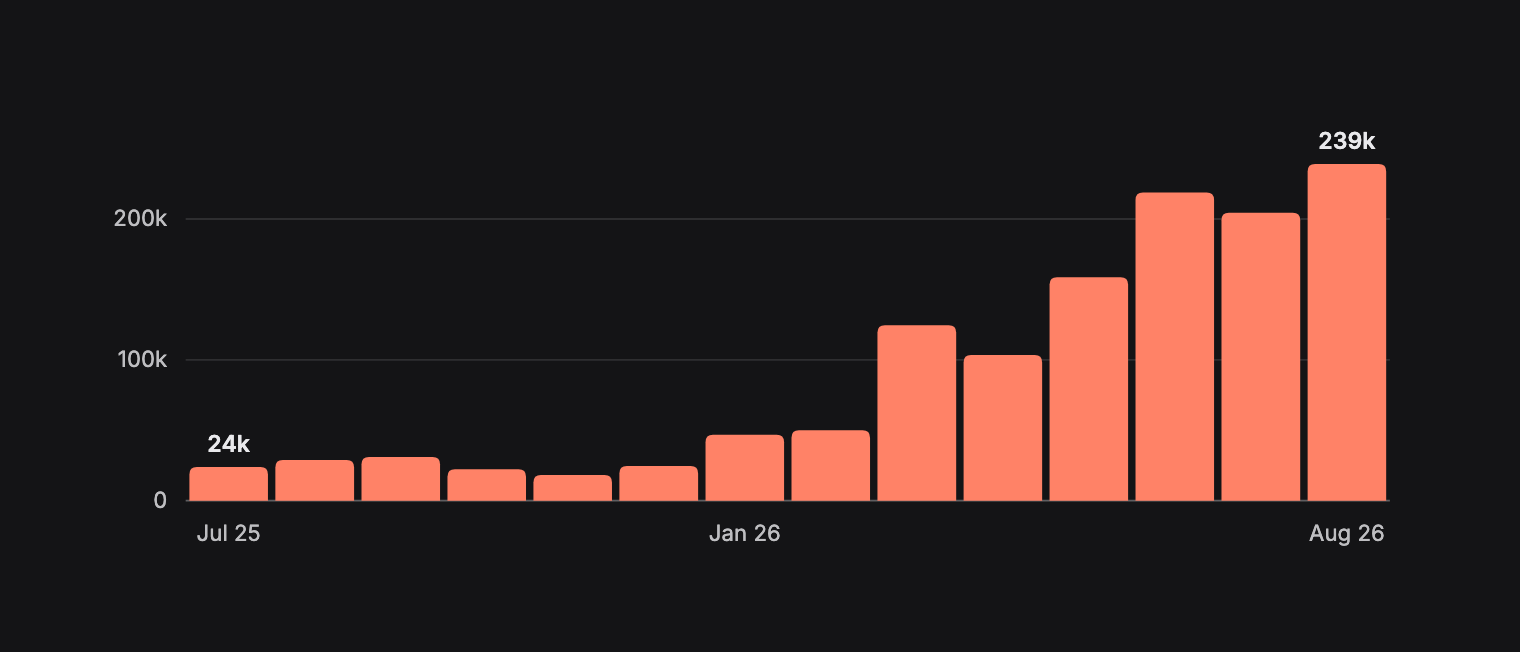
CoreWriter RawAction logs per calendar month in UTC, from the month of CoreWriter's first action to the last full month before block 45,628,967. The first bar is a partial month. Summed from the indexer's DailyBoundaryStat table with the script under Querying the Result.
What HyperEVM Asks HyperCore to Do
| Action ID | Action | Actions | Senders |
|---|---|---|---|
13 | Send asset | 920,796 | 2,102 |
1 | Limit order | 140,521 | 1,153 |
6 | Spot send | 123,809 | 3,804 |
4 | Staking deposit | 73,048 | 399 |
3 | Token delegate | 29,542 | 388 |
7 | USD class transfer | 21,321 | 2,685 |
9 | Add API wallet | 20,333 | 4,105 |
12 | Approve builder fee | 19,416 | 2,248 |
11 | Cancel order by cloid | 7,780 | 62 |
2 | Vault transfer | 3,105 | 528 |
5 | Staking withdraw | 2,777 | 114 |
10 | Cancel order by oid | 1,899 | 90 |
| Other documented actions | 477 | ||
| Undocumented action IDs (52) | 984 | ||
0 | Unassigned, including payloads too short to decode | 252 | 33 |
Every CoreWriter action to block 45,628,967, grouped by action ID. Senders counts distinct addresses per action. From the indexer's CoreActionType table.
Send asset leads, and 85% of it comes from one address. 0x6b9e…0a24 is Circle's CoreDepositWallet, the contract spotMeta links to USDC, and every one of its 785,094 actions is a Send asset, 57.5% of all CoreWriter traffic. The ten busiest senders together account for 72.9%. Leave that one contract out and Limit order is the most common action. That is the thing to know before reading any CoreWriter figure, because most of what has gone through CoreWriter is USDC deposits.
The data also holds 984 actions whose bytes 2 to 4 give one of 52 IDs that Hyperliquid's docs do not list, most of them a handful of times each. The largest is ID 14, which sits in a gap in the documented numbering, with 739 actions from 9 senders. Action ID 0, which the encoding does not assign, holds 252 actions, including the payloads too short to decode. 317 payloads, those short ones included, did not carry version 1.
Why Most CoreWriter Actions Are USDC Deposits
The wallet's published source explains the pattern. A deposit names a HyperCore dex. If forwarding is on and that dex is enabled, the wallet emits the Transfer into the USDC system address from its own address, which credits the wallet's spot balance, then sends a CoreWriter Send asset to move the USDC to the recipient on that dex. Otherwise it emits the Transfer from the recipient's address, and HyperCore credits the recipient's spot balance directly. In the source comments, dex 0 is the default perps dex and uint32.max is spot.
To see that in the data, we decoded every action the wallet sent in the 100,000 blocks just before block 45,628,967 and checked them against the wallet's own Transfer logs.
Show the USDC deposit check
import os, json, time, collections, urllib.request, urllib.error

TOKEN = os.environ["ENVIO_API_TOKEN"]
HYPERSYNC = "https://hyperliquid.hypersync.xyz/query"

WALLET = "0x6b9e773128f453f5c2c60935ee2de2cbc5390a24"  # linked to USDC in spotMeta
CORE_WRITER = "0x3333333333333333333333333333333333333333"
USDC_SYSTEM = "0x2000000000000000000000000000000000000000"  # token index 0
TRANSFER = "0xddf252ad1be2c89b69c2b068fc378daa952ba7f163c4a11628f55a4df523b3ef"
SPOT_DEX = 2**32 - 1

START, END = 45_528_967, 45_628_967  # END is exclusive

def topic(address):
    return "0x" + "0" * 24 + address[2:]

def logs(selection, fields):
    out, block = [], START
    while block < END:
        req = urllib.request.Request(
            HYPERSYNC,
            data=json.dumps({
                "from_block": block,
                "to_block": END,
                "logs": [selection],
                "field_selection": {"log": fields},
            }).encode(),
            headers={"Content-Type": "application/json",
                     "Authorization": f"Bearer {TOKEN}"},
        )
        for attempt in range(6):
            try:
                with urllib.request.urlopen(req, timeout=120) as r:
                    d = json.loads(r.read())
                break
            except urllib.error.HTTPError as e:
                if e.code != 429:
                    raise
                time.sleep(10 * (attempt + 1))  # rate limited, wait and retry
        else:
            raise RuntimeError("still rate limited after retries")
        for batch in d["data"]:
            out += batch.get("logs", [])
        if d["next_block"] <= block:
            break
        block = d["next_block"]
    return out

# CoreWriter actions the wallet sent
actions = logs({"address": [CORE_WRITER], "topics": [[], [topic(WALLET)]]}, ["data"])
ids, routes, tokens, recipients = (collections.Counter(), collections.Counter(),
                                   collections.Counter(), set())
for log in actions:
    data = log["data"][2:]
    length = int(data[64:128], 16)
    payload = data[128:128 + length * 2]
    action_id = int(payload[2:8], 16)
    ids[action_id] += 1
    if action_id != 13:  # Send asset
        continue
    words = [payload[8 + i * 64:8 + (i + 1) * 64] for i in range(6)]
    recipients.add(words[0][-40:])
    source, destination = int(words[2], 16), int(words[3], 16)
    routes[("spot" if source == SPOT_DEX else source,
            "spot" if destination == SPOT_DEX else destination)] += 1
    tokens[int(words[4], 16)] += 1

# Transfer logs the wallet itself emitted into the USDC system address
signals = logs({"address": [WALLET], "topics": [[TRANSFER], [], [topic(USDC_SYSTEM)]]}, ["topic1"])
forwarded = sum(1 for log in signals if log["topic1"][-40:] == WALLET[2:])

print(f"Blocks {START:,} to {END - 1:,}")
print(f"CoreWriter actions from the wallet: {len(actions):,}, by action ID {dict(ids)}")
print(f"Send asset routes (source dex, destination dex): {dict(routes)}")
print(f"Send asset token indexes: {dict(tokens)}, distinct recipients: {len(recipients):,}")
print(f"Transfer logs from the wallet into the USDC system address: {len(signals):,}, "
      f"{forwarded:,} of them sent from the wallet itself")
Blocks 45,528,967 to 45,628,966
CoreWriter actions from the wallet: 6,737, by action ID {13: 6737}
Send asset routes (source dex, destination dex): {('spot', 0): 6737}
Send asset token indexes: {0: 6737}, distinct recipients: 4,791
Transfer logs from the wallet into the USDC system address: 10,532, 6,737 of them sent from the wallet itself
In that window every one of the wallet's 6,737 actions moved USDC, token index 0, from spot to the default perps dex, to 4,791 different recipients. That count matches exactly the 6,737 Transfer logs the wallet emitted from its own address, so each forwarded deposit produced one of each. The other 3,795 deposits went to spot with no CoreWriter action at all. Two things follow for an indexer. The user on these RawAction logs is the wallet rather than the recipient, whose address is inside the payload, and the SpotSender count for USDC includes the wallet as a single sender for every forwarded deposit.
HYPE and Spot Tokens Moving to HyperCore
Spot token transfers to HyperCore reached 323,520 in the last full month indexed, the highest full month in the window. HYPE sent the same way peaked at 94,540 and was 22,603 in the last full month, under a quarter of that peak.
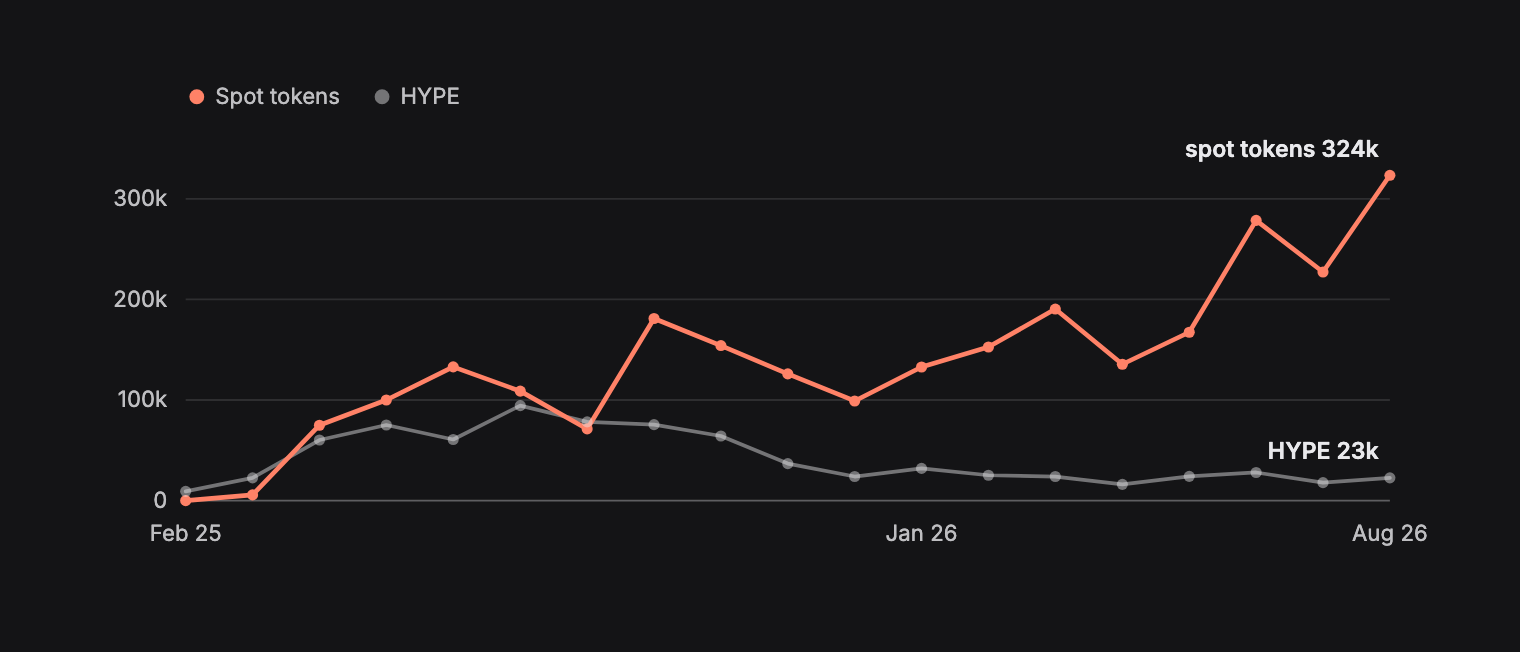
Transfers to HyperCore per calendar month in UTC, from HyperEVM's first HYPE transfer to the last full month before block 45,628,967. The first month is partial for HYPE, and spot tokens start in the second month, which is also partial. Spot tokens count Transfer logs into a system address from the linked contract. HYPE counts Received logs from 0x2222…2222. Summed from the indexer's DailyBoundaryStat table.
| Token | Index | Transfers | Senders |
|---|---|---|---|
USDC | 0 | 1,049,036 | 21,853 |
USDT0 | 268 | 288,019 | 22,279 |
UPUMP (Unit Pump Fun) | 299 | 197,014 | 1,529 |
KNTQ (Kinetiq) | 124 | 128,783 | 1,866 |
PURR | 1 | 114,259 | 2,428 |
UETH (Unit Ethereum) | 221 | 109,333 | 11,297 |
USDE (USDe) | 235 | 95,251 | 6,380 |
UBTC (Unit Bitcoin) | 197 | 92,740 | 9,391 |
FEUSD (Felix USD) | 241 | 79,595 | 6,276 |
USDH | 360 | 64,235 | 4,724 |
The ten linked spot tokens with the most transfers to HyperCore, to block 45,628,967. Token names, full names where they differ, and indexes from spotMeta. Senders counts distinct addresses.
USDC alone accounts for 37.6% of spot token transfers to HyperCore. Across all tokens, 597 transfers went to a system address from a contract other than the one spotMeta links to that index, and the indexer keeps those out of the token totals.
What Credits From HyperCore Leave Behind
These two checks skip the indexer and ask HyperSync and the official RPC directly. They use Python 3 and nothing outside its standard library, and read your Envio API token from the environment.
export ENVIO_API_TOKEN=your_token_here
The first script lists the system transactions the official RPC reports for 200 blocks through eth_getSystemTxsByBlockNumber, then asks HyperSync for every transaction in the same blocks. It waits between RPC calls to stay inside the public endpoint's limit, so expect it to take a few minutes.
Show the system transaction check
import os, json, time, urllib.request, urllib.error

TOKEN = os.environ["ENVIO_API_TOKEN"]
RPC = "https://rpc.hyperliquid.xyz/evm"
HYPERSYNC = "https://hyperliquid.hypersync.xyz/query"

def post(url, body, headers={}):
    for attempt in range(6):
        req = urllib.request.Request(
            url,
            data=json.dumps(body).encode(),
            headers={"Content-Type": "application/json", **headers},
        )
        try:
            with urllib.request.urlopen(req, timeout=120) as r:
                return json.loads(r.read())
        except urllib.error.HTTPError as e:
            if e.code != 429:
                raise
            time.sleep(10 * (attempt + 1))  # rate limited, wait and retry
    raise RuntimeError("still rate limited after retries")

def rpc(method, *params):
    body = {"jsonrpc": "2.0", "id": 1, "method": method, "params": list(params)}
    for attempt in range(6):
        reply = post(RPC, body)
        if "result" in reply:
            return reply["result"]
        time.sleep(10 * (attempt + 1))  # the public RPC rate limits by IP
    raise RuntimeError(f"RPC error: {reply.get('error')}")

START, END = 45_600_000, 45_600_200

# System transactions, from the official RPC's dedicated method
system, blocks_with = set(), 0
for number in range(START, END):
    txs = rpc("eth_getSystemTxsByBlockNumber", hex(number)) or []
    blocks_with += bool(txs)
    system.update(tx["hash"] for tx in txs)
    time.sleep(0.65)  # the public RPC allows 100 requests a minute

# Every transaction HyperSync returns for the same blocks
returned, block = set(), START
while block < END:
    d = post(
        HYPERSYNC,
        {
            "from_block": block,
            "to_block": END,
            "transactions": [{}],
            "field_selection": {"transaction": ["hash"]},
        },
        {"Authorization": f"Bearer {TOKEN}"},
    )
    for batch in d["data"]:
        returned.update(tx["hash"] for tx in batch.get("transactions", []))
    if d["next_block"] <= block:
        break
    block = d["next_block"]

print(f"{END - START} blocks, {blocks_with} with system transactions, "
      f"{len(system)} system transactions")
print(f"HyperSync returned {len(returned)} transactions, "
      f"{len(system & returned)} of them system transactions")
200 blocks, 25 with system transactions, 37 system transactions
HyperSync returned 391 transactions, 0 of them system transactions
None of the 37 system transactions came back from HyperSync. Block 45,600,053 in that window credited USDUC to 0xd1b3…9665. The second script sums that address's Transfer history through HyperSync up to the same block as the rest of this post, then compares it with its balanceOf on the official RPC when you run it.
Show the balance check
import os, json, time, urllib.request, urllib.error

TOKEN = os.environ["ENVIO_API_TOKEN"]
HYPERSYNC = "https://hyperliquid.hypersync.xyz"
RPC = "https://rpc.hyperliquid.xyz/evm"

# USDUC, and an address it was credited to from HyperCore at block 45,600,053
CONTRACT = "0x61ef9543f8919bb06e374b3bb58a17725e34f9d9"
HOLDER = "0xd1b3aa51c16f3be6859b5f0811a08bc37d9c9665"
TRANSFER = "0xddf252ad1be2c89b69c2b068fc378daa952ba7f163c4a11628f55a4df523b3ef"
HOLDER_TOPIC = "0x" + "0" * 24 + HOLDER[2:]

def post(url, body, headers={}):
    for attempt in range(6):
        req = urllib.request.Request(
            url,
            data=json.dumps(body).encode(),
            headers={"Content-Type": "application/json", **headers},
        )
        try:
            with urllib.request.urlopen(req, timeout=120) as r:
                return json.loads(r.read())
        except urllib.error.HTTPError as e:
            if e.code != 429:
                raise
            time.sleep(10 * (attempt + 1))  # rate limited, wait and retry
    raise RuntimeError("still rate limited after retries")

END = 45_628_968  # stop at the same block as the rest of the post, so the counts stay fixed

def total(topics):
    """Count and sum every matching Transfer log from genesis up to END."""
    amount, count, block = 0, 0, 0
    while block < END:
        d = post(
            f"{HYPERSYNC}/query",
            {
                "from_block": block,
                "to_block": END,
                "logs": [{"address": [CONTRACT], "topics": topics}],
                "field_selection": {"log": ["data"]},
            },
            {"Authorization": f"Bearer {TOKEN}"},
        )
        for batch in d["data"]:
            for log in batch.get("logs", []):
                amount += int(log["data"], 16)
                count += 1
        if d["next_block"] <= block:
            break
        block = d["next_block"]
    return count, amount

logs_in, received = total([[TRANSFER], [], [HOLDER_TOPIC]])
logs_out, sent = total([[TRANSFER], [HOLDER_TOPIC]])

call = {"to": CONTRACT, "data": "0x70a08231" + HOLDER_TOPIC[2:]}  # balanceOf
body = {"jsonrpc": "2.0", "id": 1, "method": "eth_call", "params": [call, "latest"]}
balance = int(post(RPC, body)["result"], 16)

print(f"Up to block {END - 1:,}")
print(f"Transfer logs received: {logs_in}, total {received:,}")
print(f"Transfer logs sent: {logs_out}, total {sent:,}")
print(f"Balance rebuilt from logs: {received - sent:,}")
print(f"balanceOf on the official RPC when run: {balance:,}")
Up to block 45,628,967
Transfer logs received: 0, total 0
Transfer logs sent: 4, total 328,398,759,981
Balance rebuilt from logs: -328,398,759,981
balanceOf on the official RPC when run: 0
Up to that block, the address had never received a USDUC Transfer log, yet it had sent four, so a balance built from logs came out at -328,398,759,981 base units. Its actual balance was zero when we ran it. balanceOf reads the latest block, because the public RPC only answers state reads there, so a later run can print a different balance. None of the tokens it sent arrived with a log.
How to Account for Credits From HyperCore
If you need correct balances, don't build them from logs alone. For a current balance, read balanceOf on the token, or eth_getBalance for HYPE, from the official RPC. It answers those at the latest block only, so this gives you the current balance, not the history.
To see each credit, ask the official RPC for the block's system transactions and decode them. This script does that for 21 blocks.
Show the credit decoder
import json, time, urllib.request, urllib.error

RPC = "https://rpc.hyperliquid.xyz/evm"
TRANSFER = "0xa9059cbb"  # transfer(address,uint256)
HYPE_SYSTEM = "0x2222222222222222222222222222222222222222"

def rpc(method, *params):
    body = {"jsonrpc": "2.0", "id": 1, "method": method, "params": list(params)}
    for attempt in range(6):
        req = urllib.request.Request(
            RPC, data=json.dumps(body).encode(), headers={"Content-Type": "application/json"}
        )
        try:
            with urllib.request.urlopen(req, timeout=120) as r:
                reply = json.loads(r.read())
            if "result" in reply:
                return reply["result"]
        except urllib.error.HTTPError as e:
            if e.code != 429:
                raise
        time.sleep(10 * (attempt + 1))  # the public RPC rate limits by IP
    raise RuntimeError("still rate limited after retries")

def describe(tx):
    """Turn one system transaction into a readable credit."""
    if tx["from"] == HYPE_SYSTEM:
        return f"HYPE {int(tx['value'], 16):,} wei to {tx['to']}"
    if tx["input"].startswith(TRANSFER):
        recipient = "0x" + tx["input"][34:74]
        amount = int(tx["input"][74:138], 16)
        return f"transfer of {amount:,} on {tx['to']} to {recipient}, sent by {tx['from']}"
    return f"call {tx['input'][:10]} on {tx['to']}, sent by {tx['from']}"

START, END = 45_600_053, 45_600_074

for number in range(START, END):
    for tx in rpc("eth_getSystemTxsByBlockNumber", hex(number)) or []:
        print(f"{number:,}  {describe(tx)}")
    time.sleep(0.65)  # the public RPC allows 100 requests a minute
45,600,053  transfer of 450,004,539,308 on 0xb88339cb7199b77e23db6e890353e22632ba630f to 0xc20699185c15d0a2fd65779bb5d69f5b0b113c00, sent by 0x6b9e773128f453f5c2c60935ee2de2cbc5390a24
45,600,053  transfer of 59,576,267,435 on 0x61ef9543f8919bb06e374b3bb58a17725e34f9d9 to 0xd1b3aa51c16f3be6859b5f0811a08bc37d9c9665, sent by 0x2000000000000000000000000000000000000180
45,600,053  transfer of 9,991,621,766 on 0xb88339cb7199b77e23db6e890353e22632ba630f to 0x6b9e773128f453f5c2c60935ee2de2cbc5390a24, sent by 0xc20699185c15d0a2fd65779bb5d69f5b0b113c00
45,600,053  call 0x6ddde35e on 0x6b9e773128f453f5c2c60935ee2de2cbc5390a24, sent by 0x2000000000000000000000000000000000000000
45,600,054  transfer of 999,162,176 on 0xb88339cb7199b77e23db6e890353e22632ba630f to 0xc20699185c15d0a2fd65779bb5d69f5b0b113c00, sent by 0x6b9e773128f453f5c2c60935ee2de2cbc5390a24
45,600,064  transfer of 2,434,338,000 on 0xb88339cb7199b77e23db6e890353e22632ba630f to 0xc20699185c15d0a2fd65779bb5d69f5b0b113c00, sent by 0x6b9e773128f453f5c2c60935ee2de2cbc5390a24
45,600,068  transfer of 500,000,000 on 0xb88339cb7199b77e23db6e890353e22632ba630f to 0x6b9e773128f453f5c2c60935ee2de2cbc5390a24, sent by 0xc20699185c15d0a2fd65779bb5d69f5b0b113c00
45,600,068  call 0x6ddde35e on 0x6b9e773128f453f5c2c60935ee2de2cbc5390a24, sent by 0x2000000000000000000000000000000000000000
45,600,069  transfer of 50,000,000 on 0xb88339cb7199b77e23db6e890353e22632ba630f to 0xc20699185c15d0a2fd65779bb5d69f5b0b113c00, sent by 0x6b9e773128f453f5c2c60935ee2de2cbc5390a24
45,600,073  transfer of 4,494,015,000 on 0xb88339cb7199b77e23db6e890353e22632ba630f to 0xc20699185c15d0a2fd65779bb5d69f5b0b113c00, sent by 0x6b9e773128f453f5c2c60935ee2de2cbc5390a24
45,600,073  HYPE 112,800,984,030,000,000,000 wei to 0xe89b2a0c303091e195abdf26d008ebd1cc89e50d
Three kinds of rows show up.
- Linked tokens. The token's system address calls
transfer(recipient, amount)on the linked contract, as Hyperliquid's docs describe. TheUSDUCrow at block 45,600,053 is the credit to the address whose balance we rebuilt above. - HYPE.
0x2222…2222sends HYPE as plain value with no calldata, so the amount is the transaction'svalue. - USDC. Its linked contract is Circle's CoreDepositWallet, so a credit is
0x2000…0000callingtransfer(recipient, amount)on the wallet. None arrived in these 21 blocks, but the round trip under Checking What Happened on HyperCore has one. The USDC rows here move USDC back and forth between the wallet and one address,0xc206…3c00, so check the sender and recipient before you count a row as a credit to a user. The0x6ddde35ecalls are the wallet'scoreReceiveWithData, which Circle's source describes as a withdrawal from HyperCore to another chain through CCTP, not a credit on HyperEVM. In both blocks with one, a row from0xc206…3c00to the wallet carries the same amount as the withdrawal.
One credit can also carry more than one hash. The official RPC gives each system transaction a hash, and explorers list the same credits under different ones. At block 45,995,119 the explorer showed 8 transactions, 6 of them matching the official RPC's regular transactions and 2 more that are the block's system transactions, with hashes the RPC never returns. One of those two is the credit itself, and the other is one of the 0xc206…3c00 rows above. Looking up the RPC's hash on that explorer finds nothing, and the RPC only answers for its own hash through eth_getSystemTxsByBlockNumber. If you line these records up across sources, match on block, sender, recipient and amount rather than on the hash.
To follow new blocks instead of a fixed range, start from eth_blockNumber and keep polling. It takes one request per block, and 100 requests a minute is enough for the 61 blocks a minute HyperEVM produced when we measured it. It won't backfill history, because reaching block 45,628,967 that way would take more than 300 days.
For the node implementations that do return these transactions, and how HyperSync checks each block against the roots in its header, see Nodes Silently Miss Events.
Checking What Happened on HyperCore
A RawAction log records a request. To see what HyperCore did with it, ask Hyperliquid's info endpoint, which needs no API key. The two sides never share a transaction hash, so you match records on account, token, amount and time.
| On HyperEVM | Info request | What to look for |
|---|---|---|
| CoreWriter limit order with a client order ID | orderStatus, with user set to the sender and oid set to the cloid in hex | The order's status, such as filled |
CoreWriter Send asset | userNonFundingLedgerUpdates for the sender | A send with the same destination and amount |
| HYPE or a spot token sent to its system address | userNonFundingLedgerUpdates for the sender | A spotTransfer whose user is the system address and whose destination is the sender |
| Credit from HyperCore | userNonFundingLedgerUpdates for the recipient | A send or spotTransfer from the recipient to the token's system address |
Request types from Hyperliquid's info endpoint and perpetuals info docs. The matching rules are ours, checked against the examples below.
Reading 50 blocks of CoreWriter logs from the official RPC is enough to show both. The script below decodes limit orders and Send asset actions, then looks each one up on HyperCore. It uses Python 3 and needs no token.
Show the HyperCore check
import json, time, urllib.request, urllib.error
from decimal import Decimal

RPC = "https://rpc.hyperliquid.xyz/evm"
INFO = "https://api.hyperliquid.xyz/info"
CORE_WRITER = "0x3333333333333333333333333333333333333333"
START, END = 45_995_091, 45_995_140  # 50 blocks, the documented limit for one public eth_getLogs request

def post(url, body):
    for attempt in range(6):
        req = urllib.request.Request(
            url, data=json.dumps(body).encode(), headers={"Content-Type": "application/json"}
        )
        try:
            with urllib.request.urlopen(req, timeout=120) as r:
                reply = json.loads(r.read())
            if not (isinstance(reply, dict) and "error" in reply):
                return reply
        except urllib.error.HTTPError as e:
            if e.code != 429:
                raise
        time.sleep(10 * (attempt + 1))  # rate limited, wait and retry
    raise RuntimeError("still rate limited after retries")

def rpc(method, *params):
    return post(RPC, {"jsonrpc": "2.0", "id": 1, "method": method, "params": list(params)})["result"]

def words(payload, count):
    """Split the ABI-encoded fields after the 4-byte header into 32-byte words."""
    return [int(payload[8 + 64 * i : 8 + 64 * (i + 1)], 16) for i in range(count)]

wei_decimals = {t["index"]: t["weiDecimals"] for t in post(INFO, {"type": "spotMeta"})["tokens"]}
logs = rpc("eth_getLogs", {"fromBlock": hex(START), "toBlock": hex(END), "address": CORE_WRITER})

for log in logs:
    data = log["data"][2:]
    payload = data[128 : 128 + int(data[64:128], 16) * 2]  # the bytes inside RawAction's data
    action_id = int(payload[2:8], 16)
    sender = "0x" + log["topics"][1][26:]
    block = int(log["blockNumber"], 16)

    if action_id == 1:  # Limit order, looked up on HyperCore by its client order ID
        asset, is_buy, limit_px, sz, _, _, cloid = words(payload, 7)
        if cloid == 0:
            print(f"{block:,}  limit order with no cloid, not checked")
            continue
        reply = post(INFO, {"type": "orderStatus", "user": sender, "oid": f"0x{cloid:032x}"})
        order = reply.get("order", {})
        coin = order.get("order", {}).get("coin", "?")
        print(f"{block:,}  limit order {coin} size {sz / 1e8} at {limit_px / 1e8}: {order.get('status', reply['status'])}")

    elif action_id == 13:  # Send asset, looked up in the sender's HyperCore ledger
        destination, _, _, _, token, wei = words(payload, 6)
        destination = f"0x{destination:040x}"
        amount = Decimal(wei) / 10 ** wei_decimals[token]
        ts = int(rpc("eth_getBlockByNumber", hex(block), False)["timestamp"], 16) * 1000
        ledger = post(
            INFO,
            {"type": "userNonFundingLedgerUpdates", "user": sender, "startTime": ts - 2000, "endTime": ts + 10000},
        )
        match = [
            e for e in ledger
            if e["delta"].get("destination") == destination and Decimal(e["delta"]["amount"]) == amount
        ]
        found = f"ledger send at {match[0]['time']}" if match else "no matching ledger entry"
        print(f"{block:,}  send asset {amount} of token {token} to {destination}: {found}")

    else:
        print(f"{block:,}  action {action_id}, not checked")
    time.sleep(1)  # stay well inside the info endpoint's weight limit
45,995,091  limit order BTC size 0.00143 at 75905.0: filled
45,995,091  limit order ETH size 0.0398 at 2383.2: filled
45,995,091  limit order SOL size 0.97 at 98.417: filled
45,995,109  send asset 1530.9 of token 0 to 0x4c12ad4eaae7e79ab134685ef2aa6f80b30e6dff: ledger send at 1789497457469
45,995,118  send asset 12.042917 of token 0 to 0x2000000000000000000000000000000000000000: ledger send at 1789497466372
45,995,122  send asset 49.9 of token 0 to 0xcc4d062dc62f80921c7035049530b752468f6a35: ledger send at 1789497470387
45,995,123  send asset 13.650559 of token 0 to 0x2000000000000000000000000000000000000000: ledger send at 1789497471437
45,995,129  send asset 149 of token 0 to 0xd9c228c0f84cb4dc2fb37f5af496ef16ea94fd79: ledger send at 1789497477368
45,995,131  send asset 579.79 of token 0 to 0xf5787933111d85bda90d85ec6f9b3a16b00f0c41: ledger send at 1789497479458
All nine actions show up on HyperCore. The three limit orders filled, and each Send asset has a matching ledger send. HyperCore's amounts use the token's HyperCore decimals, which is why the script reads weiDecimals from spotMeta.
The two sends to 0x2000…0000 are USDC leaving HyperCore for HyperEVM, and both come back as system transactions in the next block. Here is the first one.
- At block 45,995,118,
0x0b77…654csends CoreWriter aSend assetof 12.042917 USDC to the USDC system address. - HyperCore's ledger records a
sendof 12.042917 USDC from0x0b77…654cto0x2000…0000. - At block 45,995,119, the official RPC lists a system transaction in which
0x2000…0000callstransferon Circle's CoreDepositWallet for0x0b77…654cwith 12,042,917, the same amount at USDC's 6 decimals on HyperEVM.
The CoreWriter transaction, the ledger entry and the system transaction each have a different hash.
A few limits apply. Hyperliquid's rate limits give each IP 1,200 weight a minute, with orderStatus at 2 and most other info requests at 20. Requests that take a time range return at most 500 entries, so page by moving startTime forward. Query the account's own address, since an agent wallet's address returns an empty result. An order sent without a client order ID has no ID in its log to look up, so match it through historicalOrders or userFills instead, which return the 2,000 most recent entries.
Querying the Result
Once the indexer is running, http://localhost:8080 gives you a Hasura console over the entities. Because the schema stores running totals, the common questions are one query each. Hasura returns BigInt columns such as amount as strings, in each token's HyperEVM base units, so convert them before doing any math.
The boundary totals.
query Totals {
  BoundaryTotal {
    coreActions
    coreWriterSenders
    hypeTransfers
    spotTransfers
    unlinkedSystemTransfers
  }
}
Show the result
{
  "BoundaryTotal": [
    { "coreActions": 1366060, "coreWriterSenders": 7710, "hypeTransfers": 797973, "spotTransfers": 2791390, "unlinkedSystemTransfers": 597 }
  ]
}
The most common CoreWriter actions.
query ActionMix {
  CoreActionType(order_by: { count: desc }, limit: 5) {
    actionId
    name
    count
    senders
  }
}
Show the result
{
  "CoreActionType": [
    { "actionId": 13, "name": "Send asset", "count": 920796, "senders": 2102 },
    { "actionId": 1, "name": "Limit order", "count": 140521, "senders": 1153 },
    { "actionId": 6, "name": "Spot send", "count": 123809, "senders": 3804 },
    { "actionId": 4, "name": "Staking deposit", "count": 73048, "senders": 399 },
    { "actionId": 3, "name": "Token delegate", "count": 29542, "senders": 388 }
  ]
}
Everything one address has sent through CoreWriter. Addresses are stored in checksummed form, the mixed-case form the explorers show, so filter with that exact form or the query returns nothing.
query SenderActions {
  SenderAction(
    where: { sender: { _eq: "0x6B9E773128f453f5c2C60935Ee2DE2CBc5390A24" } }
  ) {
    actionId
    count
  }
}
Show the result
{
  "SenderAction": [
    { "actionId": 13, "count": 785094 }
  ]
}
The spot tokens moved to HyperCore most often.
query SpotTokens {
  SpotTokenToCore(order_by: { transfers: desc }, limit: 5) {
    name
    tokenIndex
    transfers
    senders
  }
}
Show the result
{
  "SpotTokenToCore": [
    { "name": "USDC", "tokenIndex": 0, "transfers": 1049036, "senders": 21853 },
    { "name": "USDT0", "tokenIndex": 268, "transfers": 288019, "senders": 22279 },
    { "name": "UPUMP", "tokenIndex": 299, "transfers": 197014, "senders": 1529 },
    { "name": "KNTQ", "tokenIndex": 124, "transfers": 128783, "senders": 1866 },
    { "name": "PURR", "tokenIndex": 1, "transfers": 114259, "senders": 2428 }
  ]
}
Monthly totals, which is what the charts above are built from. This script pages through DailyBoundaryStat and sums by month.
Show the monthly totals script
import json, urllib.request, collections, datetime

URL = "http://localhost:8080/v1/graphql"
QUERY = """
query Daily($offset: Int!) {
  DailyBoundaryStat(order_by: { day: asc }, limit: 500, offset: $offset) {
    day
    coreActions
    hypeTransfers
    spotTransfers
  }
}
"""

def fetch(offset):
    req = urllib.request.Request(
        URL,
        data=json.dumps({"query": QUERY, "variables": {"offset": offset}}).encode(),
        headers={"Content-Type": "application/json",
                 "x-hasura-admin-secret": "testing"},
    )
    with urllib.request.urlopen(req) as r:
        return json.loads(r.read())["data"]["DailyBoundaryStat"]

rows, offset = [], 0
while True:
    page = fetch(offset)
    rows += page
    if len(page) < 500:
        break
    offset += 500

months = collections.defaultdict(lambda: [0, 0, 0])
for row in rows:
    month = datetime.datetime.fromtimestamp(row["day"] * 86_400, datetime.timezone.utc)
    totals = months[month.strftime("%Y-%m")]
    totals[0] += row["coreActions"]
    totals[1] += row["hypeTransfers"]
    totals[2] += row["spotTransfers"]

print("month    core_actions  hype_to_core  spot_to_core")
for month, (core, hype, spot) in sorted(months.items()):
    print(f"{month}  {core:>12,}  {hype:>12,}  {spot:>12,}")
Show the result
month    core_actions  hype_to_core  spot_to_core
2025-02             0         9,123             0
2025-03             0        22,583         5,738
2025-04             0        60,302        74,962
2025-05             0        75,208        99,983
2025-06             0        60,862       133,057
2025-07        23,863        94,540       108,912
2025-08        28,771        78,305        71,320
2025-09        30,994        75,451       181,061
2025-10        22,199        64,200       154,141
2025-11        18,199        36,917       126,082
2025-12        24,638        23,994        99,196
2026-01        46,673        32,087       132,766
2026-02        49,973        25,258       152,723
2026-03       124,652        23,962       190,549
2026-04       103,430        16,165       135,647
2026-05       158,738        24,212       167,479
2026-06       218,843        27,951       278,774
2026-07       204,408        17,809       227,322
2026-08       239,079        22,603       323,520
2026-09        71,600         6,441       128,158
Troubleshooting
| Error or symptom | Cause | Fix |
|---|---|---|
ERR_PNPM_IGNORED_BUILDS on pnpm add envio | pnpm skipped esbuild's build script | Install with --allow-build=esbuild |
invalid input syntax for type integer: "NaN" | A CoreWriter payload too short to decode | Check the payload length before parsing, as the handler does |
Type 'string' is not assignable to type '`0x${string}`' | The where filter's addresses are typed as plain strings | Type the address array as `0x${string}` |
query exceeds max block range 1000 or rate limited from rpc.hyperliquid.xyz | The public RPC's range and rate limits | Read history through HyperSync, and keep the public RPC for small lookups |
Your token is malformed from HyperSync or HyperRPC | The request has no valid Envio API token | Add your token, as a bearer header for HyperSync or at the end of the HyperRPC URL |
Your token does not have access to this product from HyperRPC | The API token doesn't include HyperRPC | Use a token with HyperRPC access |
| A balance rebuilt from logs is negative | Credits from HyperCore have no log | See How to Account for Credits From HyperCore |
unknownOid from orderStatus | No order with that ID for that user | Pass the address that sent the CoreWriter action |
| An empty info endpoint response | The address is an agent wallet, or nothing happened in that time range | Query the account's own address, and widen the time range |
Replicate This With Your Own Agent
If you would rather hand the job to your coding agent, the block below was written from the finished indexer and carries the traps that cost us time.
Give the agent the current documentation first, so it works from live syntax rather than from whatever it remembers.
claude mcp add --transport http envio-docs https://docs.envio.dev/mcp
Cursor and VS Code take the same endpoint in their MCP configuration. The same search is built into the CLI as envio tools search-docs, so an agent with shell access needs no MCP setup. Both are documented on the MCP server page.
Then paste this.
Show the full prompt
Build me an Envio HyperIndex indexer for everything HyperEVM (Hyperliquid,
chain ID 999) sends to HyperCore.

Target the current HyperIndex. Install with `pnpm add envio --allow-build=esbuild`, and read the live
docs before writing code, since syntax can change between releases. If you have
the envio-docs MCP server, use docs_search and docs_fetch. Otherwise run
`envio tools search-docs <query>` and `envio tools fetch-docs <url>`. Look up the
configuration file, event handlers, wildcard indexing and the Effect API before
you start.

SCOPE

HyperEVM is the EVM side of Hyperliquid. HyperCore, the order book side, is not
EVM data, so fills, funding and liquidations are out of scope. Index only what
HyperEVM records when something leaves for HyperCore. HyperSync is the default
data source for chain 999, so the config needs no rpc block.

Transfers from HyperCore into HyperEVM are system transactions. HyperSync does
not return them and the official RPC keeps them out of its block responses, so
do not try to index them.

THE THREE SOURCES

1. CoreWriter at 0x3333333333333333333333333333333333333333 emits

     RawAction(address indexed user, bytes data)

   The first byte of data is the encoding version, and only version 1 is
   supported. The next three bytes are the action ID, big-endian. Take the
   action names from
   https://hyperliquid.gitbook.io/hyperliquid-docs/for-developers/hyperevm/interacting-with-hypercore

2. The HYPE system address 0x2222222222222222222222222222222222222222 emits

     Received(address indexed user, uint256 amount)

   when HYPE is sent to it, which is HYPE moving to HyperCore.

3. A spot token moves to HyperCore through a Transfer to its system address,
   0x20 followed by its HyperCore token index in big-endian, so index 200 is
   0x20000000000000000000000000000000000000c8. Index Transfer as a wildcard
   event, with a where filter on `to` set to the system addresses for indexes
   0 to 1999. Only count a transfer when event.srcAddress is the contract that
   HyperCore links to that index. The link is the evmContract field returned by
   POST https://api.hyperliquid.xyz/info with body {"type":"spotMeta"}. Call it
   through createEffect with cache: true, and share one request across every
   index. Count transfers from any other contract separately.

WHAT TO STORE

Per action ID, the count, distinct senders and first and last block. Per
sender, the action count. Per HYPE sender, transfers and amount. Per linked spot
token, transfers, raw amount and distinct senders. One row per day, and a single
totals row that also counts payloads that are not version 1 and transfers from
unlinked contracts.

PROJECT SETUP

  mkdir hyperevm-hypercore-indexer && cd hyperevm-hypercore-indexer
  pnpm init
  pnpm add envio --allow-build=esbuild
  pnpm add -D typescript @types/node

Set "type": "module" in package.json. Handlers auto-load from src/handlers/.
Put the Envio API token from https://envio.dev/app/api-tokens in .env as
ENVIO_API_TOKEN, and add .env to .gitignore before your first commit.
`envio codegen` does not typecheck, so write a tsconfig.json that includes src
and .envio/types.d.ts, and run `pnpm exec tsc --noEmit` before starting.
Run it with `pnpm envio codegen` then `pnpm envio dev`, with Docker running.

TRAPS THAT WILL COST YOU TIME

- Node.js 22 or newer. The envio package declares node >=22.0.0.
- Recent pnpm releases stop `pnpm add` with ERR_PNPM_IGNORED_BUILDS for esbuild.
  Pass --allow-build=esbuild.
- CoreWriter accepts any bytes, and some RawAction payloads are too short to
  hold a version and an action ID. Parsing them blindly gives NaN, and the
  indexer stops when it writes the row with
  `invalid input syntax for type integer: "NaN"`. Check the length first and
  count those separately.
- Some payloads are not version 1, and some version 1 payloads carry action IDs
  Hyperliquid does not document. Keep both visible rather than dropping them.
- A RawAction log means the action was sent, not that HyperCore executed it.
  HyperCore rejects an action if the sending account does not already exist on
  HyperCore. Report counts as actions sent.
- spotMeta links USDC (token index 0) to Circle's CoreDepositWallet, not to the
  USDC ERC-20. The wallet emits the Transfer into 0x2000...0000 itself, so
  watching the USDC token for transfers into that address finds nothing. For
  forwarded deposits the wallet is also the RawAction user, and the recipient
  is inside the Send asset payload.
- The where filter needs addresses typed as `0x${string}`. A plain string[]
  fails typechecking with
  Type 'string' is not assignable to type '`0x${string}`'.
- Handlers run twice per event because of preload optimization, so the spotMeta
  call should go through the Effect API.
- A full sync from block 0 processes millions of events, so do not assume it
  has hung. Progress lives in the
  envio_chains table, columns progress_block, source_block and
  events_processed. You are finished when progress_block reaches source_block.
- If `envio dev` fails with "Hasura did not become healthy on port 8080 within
  120 s", run `docker logs envio-hasura`. Hasura reports inconsistent objects
  when its metadata still tracks tables from an earlier project that no longer
  exist. ENVIO_PG_SCHEMA and ENVIO_INDEXER_PORT keep a second indexer's
  Postgres data and port separate, but the local Hasura then tracks only the
  indexer that most recently created its storage.
- Hasura tracks the tables only when the indexer creates its storage. If you
  first run with ENVIO_HASURA=false and later resume with Hasura on, the
  GraphQL API reports that your entities are not found in query_root. Start
  with Hasura on, or reset the indexer so it creates the storage again.
- Running headless, set ENVIO_TUI=false. The local Hasura admin secret is
  `testing`.

WHEN IT RUNS, REPORT THESE SEPARATELY

1. The block you synced to.
2. The total CoreWriter actions, and the three most common action types with
   their counts.
3. The HYPE Received count and distinct senders.
4. Linked spot token transfers to HyperCore, and the five tokens with the most.
5. How many payloads were too short, how many were not version 1, and how many
   transfers came from unlinked contracts.

State the numbers you actually got. They grow as the chain does.
Deploying the Indexer
The complete indexer is on GitHub at enviodev/hyperevm-hypercore-indexer, if you would rather clone it than paste the files above.
The indexer doesn't stop at the block this post measured. When we left an earlier run going after it reached the chain head, it kept indexing new blocks as they arrived. For anything you want to keep online, push the repo to GitHub and deploy it on Envio Cloud, Envio's fully managed hosting for indexers, which covers the infrastructure, scaling and monitoring.
Frequently Asked Questions
What Is the HyperEVM Chain ID and RPC URL?
HyperEVM uses chain ID 999 on mainnet and 998 on testnet, with HYPE as the gas token. The public RPC endpoints are https://rpc.hyperliquid.xyz/evm for mainnet and https://rpc.hyperliquid-testnet.xyz/evm for testnet. Hyperliquid's JSON-RPC docs list eth_getLogs as limited to 50 blocks and four topics per request, and the endpoint allows 100 requests a minute, so it suits wallets and apps rather than backfills. For indexing mainnet, Envio serves HyperSync at https://hyperliquid.hypersync.xyz and a read-only JSON-RPC endpoint, HyperRPC, at https://hyperliquid.rpc.hypersync.xyz. Both need an Envio API token.
How Do I Index My Own Contract on HyperEVM?
Add the contract's address and events to config.yaml under chain 999, define what to store in schema.graphql, write a handler for each event, put your Envio API token in .env and run pnpm envio dev. HyperEVM is a HyperSync chain, so there is no RPC to configure. Indexing Your Own HyperEVM Contract has a tested example for WHYPE, and the quickstart can generate the files from a deployed contract.
What Is the Difference Between HyperEVM and HyperCore?
Both are part of Hyperliquid and share its HyperBFT consensus. HyperCore holds the exchange state, meaning the order books, margin and matching engine. HyperEVM is a general-purpose EVM where contracts run and emit logs, and those contracts can read HyperCore state through read precompiles and send it actions through CoreWriter. For data, the difference that matters is that only HyperEVM produces EVM blocks, transactions and logs, so it is the side an EVM indexer reads.
Can Envio Index HyperCore Order Book Data?
No. Envio supports Hyperliquid as chain 999, which is HyperEVM, through HyperSync, HyperRPC and HyperIndex, as listed on Envio's chain page. Fills, order book updates, funding and liquidations happen inside HyperCore's state rather than as EVM logs, so they are not in that data. What an Envio indexer can see is everything HyperEVM sends to HyperCore, meaning CoreWriter actions, HYPE sent to 0x2222…2222 and spot tokens sent to their system addresses, which is what the indexer in this post covers.
Does a CoreWriter Log Mean HyperCore Executed the Action?
No. CoreWriter at 0x3333…3333 emits a RawAction log when a contract or wallet sends an action, and HyperCore processes the action after the EVM block is built. Hyperliquid's interaction timings page notes that an action is rejected if the sending account does not already exist on HyperCore, and the CoreWriter docs say order actions and vault transfers are delayed onchain for a few seconds. Treat an indexed RawAction as an action that was sent, and check HyperCore when you need to know whether it ran. Checking What Happened on HyperCore matches limit orders by client order ID and Send asset actions against the sender's ledger.
How Do I Find a Token's System Address on HyperEVM?
Take the token's HyperCore index from Hyperliquid's spotMeta info endpoint, then write 0x20 followed by that index as a big-endian number, padded to 20 bytes. Token index 200 becomes 0x20000000000000000000000000000000000000c8. HYPE is the exception, with the system address 0x2222…2222. The same spotMeta response gives each token's linked EVM contract in its evmContract field, which is the contract whose Transfer logs HyperCore credits.
Why Is USDC's Linked Contract Not the USDC Token?
Because Circle routes USDC deposits to HyperCore through its own contract. spotMeta links USDC, token index 0, to Circle's CoreDepositWallet at 0x6b9e…0a24 rather than to the native USDC ERC-20, and the wallet's token() function returns the USDC contract. The wallet emits the Transfer into the USDC system address itself, and when dex forwarding is on and a deposit targets an enabled destination dex, it also sends a CoreWriter Send asset to move the USDC there. An indexer tracking USDC deposits to HyperCore needs to watch the wallet's logs, not the token's.
Why Does a HyperEVM Token Balance Not Match Its Transfer Logs?
Because transfers from HyperCore into HyperEVM arrive as system transactions. Hyperliquid's docs describe them as calls to transfer on the linked contract from the system address, but neither HyperSync nor the official RPC's block responses include them, so no Transfer log appears for the credit. A balance rebuilt from logs alone misses every credit from HyperCore, and for an address that received tokens that way and then sent them on, it can come out negative. Read balanceOf from the official RPC for a current balance, and decode each block's system transactions to see the credits themselves, as shown in How to Account for Credits From HyperCore. Some node implementations do return system transactions as ordinary transactions, and Nodes Silently Miss Events covers how HyperSync checks each block against its header.
How Do I Move HYPE Between HyperCore and HyperEVM?
Hyperliquid's HyperEVM docs say to send HYPE to 0x2222222222222222222222222222222222222222 to move it from HyperCore to HyperEVM, where it arrives as the native gas token rather than an ERC-20. To move it back, send HYPE as a plain value transfer to the same address on HyperEVM, and its receive function emits Received(address indexed user, uint256 amount). Other linked spot tokens use their own system address, and the transfers docs put a transfer from HyperCore to HyperEVM at 200k gas at the next block's base gas price. Only the HyperEVM to HyperCore direction leaves a log an indexer can read.
Where Does HyperCore Data Come From If Not HyperEVM?
From Hyperliquid's own interfaces for HyperCore. The info endpoint serves market and user data such as fills, the websocket API streams it, and a node writes HyperCore data to disk as described in the L1 data schemas. Hyperliquid also uploads some historical market data to a requester-pays S3 bucket. An Envio indexer covers the HyperEVM side, including everything HyperEVM sends to HyperCore.
| What you need | Where it comes from | Limit in Hyperliquid's docs |
|---|---|---|
| An account's fills | userFills or userFillsByTime on the info endpoint | 2,000 per response, and userFillsByTime reaches only the 10,000 most recent |
| An account's orders | historicalOrders, or orderStatus for one order | 2,000 most recent orders |
| Deposits, transfers and withdrawals | userNonFundingLedgerUpdates | 500 entries per time-range response |
| Live updates | The websocket API | 10 connections and 1,000 subscriptions per IP |
| Full history | A node's data on disk, or Hyperliquid's historical data bucket | Bucket uploads about once a month, with no guarantee of timely updates |
Limits from Hyperliquid's info endpoint, rate limits and historical data docs.
Can a HyperEVM Contract Read HyperCore State?
Yes. Hyperliquid's docs put the read precompile addresses from 0x…0800 upward, with methods for perps positions, spot balances, vault equity, staking delegations, oracle prices and the L1 block number, and they attach an L1Read.sol file describing them. The docs say the values match the latest HyperCore state when the EVM block is built. They answer on mainnet as well, where an eth_call to 0x…0807 returns an oracle price. A precompile read is a call rather than a log, so an indexer never sees one. For data you want to keep and query, index what HyperEVM sends to HyperCore and check outcomes through the info endpoint, as above.
How Do I Index HyperEVM Testnet?
HyperEVM testnet is chain 998, and it isn't a HyperSync network, so give HyperIndex an RPC endpoint. This is the WHYPE config from Indexing Your Own HyperEVM Contract, pointed at the public testnet RPC.
# yaml-language-server: $schema=./node_modules/envio/evm.schema.json
name: whype-indexer
description: Wrapped HYPE deposits and withdrawals on HyperEVM testnet (chain 998)

contracts:
  - name: WHYPE
    events:
      - event: "Deposit(address indexed dst, uint256 wad)"
      - event: "Withdrawal(address indexed src, uint256 wad)"

chains:
  - id: 998 # HyperEVM testnet, not a HyperSync network, so it reads from RPC
    rpc:
      - url: https://rpc.hyperliquid-testnet.xyz/evm
        for: sync
        initial_block_interval: 50 # the public endpoint's documented eth_getLogs range
        interval_ceiling: 50
    start_block: 64362621
    contracts:
      - name: WHYPE
        address: "0x5555555555555555555555555555555555555555"
The block limits match the 50-block eth_getLogs range in Hyperliquid's docs. Start close to the current testnet block. When we ran this config, the public endpoint rate limited it often, and HyperIndex kept retrying and synced about 3,000 blocks in two and a half minutes, so use your own RPC endpoint for anything bigger.
What Is the HyperEVM Block Explorer?
Hyperliquid's HyperEVM tools list includes hyperevmscan.io, listed as Etherscan, and hyperscan.com, listed as Blockscout. When we checked, hyperscan.com opened as the hl.eco HyperEVM explorer. The wallet-facing network values are also listed on Chainlist under chain 999.
Build With Envio
Envio is a real-time multichain blockchain indexer that turns onchain events into a queryable GraphQL API. Hyperliquid's HyperEVM has first-class support, so HyperSync, HyperRPC and HyperIndex all work on it out of the box. Start indexing Hyperliquid, deploy on Envio Cloud or self-host, and if you're building on Hyperliquid, come talk to us about your data needs.
Website | X | Discord | Telegram | GitHub | YouTube | Reddit