How to Index Every Tokenized Asset on Robinhood Chain
 Jordyn Laurier
- Robinhood Chain is chain ID
4663, with public RPChttps://rpc.mainnet.chain.robinhood.comand explorerrobinhoodchain.blockscout.com. - Every tokenized stock comes from one
StockFactorycontract at0x4783C67b63dE2B358Ac5951a7D41F47A38F3C046. It emitsDeployed(bytes32 indexed uid, address stock, string name, string symbol)once per token, so its log history is the full token list. - The factory has deployed more than 200 tokenized assets, but only 46 emitted any logs in a 2.8 hour sample, so scanning for activity misses most of them.
- To index them, point HyperIndex at chain 4663, register each token from that event with dynamic contract registration, and index
Transferon what it finds. HyperSync serves the full history, so you don't need an archive endpoint. - Twenty tokens carry 90.9% of every transfer, 132 saw some but fewer than a thousand, and another 31 saw none at all.
- All the code below is tested. Copy it, clone it from GitHub, or hand the job to your coding agent with our prompt.
Robinhood Chain has around 200 tokenized stocks on it. NVDA (NVIDIA), AAPL (Apple), TSLA (Tesla) and the rest, all trading around the clock as plain ERC-20s on an Ethereum Layer 2 built on Arbitrum for real-world assets. More than $50 billion in DEX volume has gone through it since it launched in July, per DefiLlama.
We wanted to know two things. Which tokens exist, since Robinhood can add more at any time, and which ones people trade. So we read the list straight from the chain and indexed three days of transfers. The busiest token in that window was SpaceX, ahead of NVIDIA, the S&P 500 ETF and Apple.
Getting the list takes one query, because every token comes from a single factory contract that announces each new one as it deploys. Everything below, from the connection details to the indexer we built on top of it, is tested and ready to copy.
This tutorial covers the tokenized assets. For the apps built on Robinhood Chain and the contracts to index for each, see Robinhood Chain Ecosystem: Live Apps and How to Index Them.
Robinhood Chain RPC, Chain ID and Explorer
Here's everything you need to connect. The values come from Robinhood's connection docs and our chain page.
| Property | Value |
|---|---|
| Chain ID | 4663 (mainnet), 46630 (testnet) |
| Gas token | ETH |
| Settlement | Ethereum, with blobs for data availability |
| Explorer | Blockscout (mainnet), explorer (testnet) |
| HyperRPC (read only) | https://robinhood.rpc.hypersync.xyz |
| HyperSync | https://robinhood.hypersync.xyz |
| Public RPC (mainnet) | https://rpc.mainnet.chain.robinhood.com |
| Public RPC (testnet) | https://rpc.testnet.chain.robinhood.com |
| Sequencer feed (mainnet) | wss://feed.mainnet.chain.robinhood.com |
| Sequencer (mainnet) | https://sequencer.mainnet.chain.robinhood.com |
HyperRPC and HyperSync are ours, and they're what an indexer points at. The other rows are Robinhood's published values.
Both of our endpoints also work with the chain ID in place of the name. https://4663.hypersync.xyz is the same HyperSync endpoint as https://robinhood.hypersync.xyz, and https://4663.rpc.hypersync.xyz is the same HyperRPC endpoint as https://robinhood.rpc.hypersync.xyz. You can find every chain we support on the supported networks list, and Chainlist has the wallet settings under chain 4663.
Robinhood's docs say the public RPC is rate limited and not meant for production, and they tell you to use a node provider for real traffic. They also say historical reads and indexing need an archive endpoint. That's normal for a public RPC, and it's why indexers use a dedicated data source.
HyperRPC speaks standard JSON-RPC, so for reads you can usually just swap the URL. It only covers eth_getLogs, block reads and transaction reads though (supported methods). It doesn't support eth_call, and you can't send transactions through it.
There's also a sequencer feed. Robinhood Chain is built on the Arbitrum stack, so the feed is a websocket stream of transactions as the sequencer orders them, before they're batched to Ethereum. It's where you watch ordering before confirmation. It only carries what the sequencer has just accepted though, with no history and no way to query it, so we'd treat it as an add-on to a backfill rather than a replacement. The indexer below reads confirmed history through HyperSync.
Three details about the chain change how you should read its data.
-
It's an Ethereum Layer 2, not an Arbitrum Layer 3. It runs on Arbitrum's technology, but Robinhood's own docs describe it as an Ethereum-compatible Layer 2 built on Arbitrum Dedicated Blockchains, and their connection page adds that it uses Ethereum blobs for data availability. So when you see an
l1BlockNumberon a block, it refers to Ethereum, not Arbitrum One. -
Ordering is first come, first served. Robinhood's docs say transactions are ordered strictly by when they reach the sequencer, and nobody can jump the queue by paying a higher fee. On a fee-priority chain you can often read urgency into what someone paid. You can't do that here. A transaction's position in a block just tells you when it arrived, which is also why the sequencer feed is where ordering information comes from.
-
Account abstraction is first class. The chain has first-class support for ERC-4337, so the address sending a transfer is often a smart account rather than someone's wallet. If you're counting users, don't treat sender addresses as people.
The Tokenized Assets on Robinhood Chain
Robinhood's factory contract has deployed over 200 tokenized assets so far, mostly US stocks, ETFs and commodity trusts. Every one is a standard ERC-20, so anything that already indexes ERC-20 transfers works on them as is, like the RWA dashboard indexer we built for stablecoins. Robinhood also publishes an assets API that lists the active ones, and it returned 194 when we checked. If a list is all you need, use that. It's the simpler option.
Most of them barely trade. Here are the busiest by transfer count over the window our indexer covers, blocks 44,000,000 to 46,622,364, which is about 2.6 million blocks or three days of chain time. These are counts of transfer events, not trading volume or dollar value.
| Symbol | Underlying | Transfers | Accounts | Contract |
|---|---|---|---|---|
SPCX | SpaceX | 1,139,971 | 29,748 | 0x4a0E…5eEa |
NVDA | NVIDIA | 849,198 | 47,886 | 0xd060…9EEC |
SPY | SPDR S&P 500 ETF | 450,090 | 14,446 | 0x117c…4C0C |
AAPL | Apple | 387,508 | 21,486 | 0xaF3D…93f9 |
TSLA | Tesla | 362,090 | 20,716 | 0x322F…3b2d |
MSFT | Microsoft | 352,257 | 17,726 | 0xe932…2e74 |
PLTR | Palantir | 339,595 | 14,934 | 0x894E…4F2A |
MU | Micron | 327,375 | 15,119 | 0xfF08…4afD |
GOOGL | Alphabet | 322,250 | 17,713 | 0x2e08…4FE3 |
AMD | AMD | 322,031 | 14,768 | 0x8692…3fdC |
META | Meta | 317,998 | 8,309 | 0xc0D6…2f35 |
COIN | Coinbase | 300,347 | 6,408 | 0x6330…450b |
SNDK | Sandisk | 288,077 | 13,603 | 0xB90A…6400 |
INTC | Intel | 262,538 | 7,286 | 0xc72b…9681 |
AMZN | Amazon | 255,139 | 16,565 | 0x12f1…bF54 |
ORCL | Oracle | 212,484 | 5,016 | 0xb099…EE03 |
USAR | USA Rare Earth | 211,786 | 4,734 | 0xd917…86a6 |
CRWV | CoreWeave | 210,896 | 4,994 | 0x5f10…49C3 |
BE | Bloom Energy | 209,137 | 4,504 | 0x822C…1867 |
GME | GameStop | 179,748 | 14,104 | 0x1b0E…153E |
Accounts counts distinct addresses seen sending or receiving in that window, not holders.
How We Found Every Tokenized Asset
Check the Prerequisites before running anything below.
That list came straight from the chain.
Start by checking you can reach HyperSync. It answers a height query without an API token, so this is the quickest test.
curl -s https://robinhood.hypersync.xyz/height
{"height":45543520}
Everything else needs an API token. You can create a free one in the Envio dashboard. Put it in an environment variable rather than in the script, as the docs recommend. The script below then goes through a window of blocks and counts every log by contract and by event signature, moving through the results with the next_block field HyperSync returns.
Show the discovery script
import os, json, urllib.request, collections, time

TOKEN = os.environ["ENVIO_API_TOKEN"]
URL = "https://robinhood.hypersync.xyz/query"

def query(body):
    req = urllib.request.Request(
        URL,
        data=json.dumps(body).encode(),
        headers={"Content-Type": "application/json",
                 "Authorization": f"Bearer {TOKEN}"},
    )
    with urllib.request.urlopen(req, timeout=180) as r:
        return json.loads(r.read())

START, END = 45_400_000, 45_500_000
contracts, signatures = collections.Counter(), collections.Counter()
total, block, t0 = 0, START, time.time()

while block < END:
    d = query({
        "from_block": block,
        "to_block": END,
        "logs": [{}],                                  # every log
        "field_selection": {"log": ["address", "topic0"]},
    })
    for batch in d.get("data", []):
        for log in batch.get("logs", []):
            contracts[log["address"]] += 1
            # Anonymous events carry no topic0, so this has to be a .get()
            topic = log.get("topic0")
            if topic:
                signatures[topic] += 1
            total += 1
    nxt = d.get("next_block")
    if not nxt or nxt <= block:
        break
    block = nxt

print(f"{total:,} logs, {len(contracts):,} contracts, "
      f"{len(signatures):,} signatures, {time.time()-t0:.0f}s")
We ran it over blocks 45,400,000 to 45,500,000. Block times across that range were just over 0.1 seconds, so 100,000 blocks is roughly 2.8 hours of chain time. Here's what came back.
4,166,782 logs, 13,297 contracts, 2,563 signatures, 80s
That's every log from every contract in the window, from one script, with no indexer running. On our runs it took anywhere from about 80 seconds to just under three minutes against the shared public endpoint, so expect a couple of minutes rather than an exact time.
These were the busiest contracts in that window.
| Symbol | What it is | Logs |
|---|---|---|
WETH | Wrapped ETH | 761,956 |
USDG | Global Dollar, the Paxos stablecoin | 243,316 |
SPCX | SpaceX, tokenized | 70,257 |
NVDA | NVIDIA, tokenized | 48,111 |
FAVORITE | Memecoin | 46,303 |
CASHCAT | Memecoin | 44,700 |
GME | GameStop, tokenized | 31,918 |
AAPL | Apple, tokenized | 28,553 |
TSLA | Tesla, tokenized | 28,155 |
Every contract in the sweep, not only tokenized assets, ranked by raw log count.
Robinhood's tokens all end their name() with • Robinhood Token. That's a handy clue, but filtering by name only finds the tokens that happened to trade in your window. It won't give you the full set.
A better way is to work out where they come from. Open any of them in the explorer and look at the Creator field on the address page.
Every one we checked had the same creator. That address is a proxy, and its implementation is a contract called StockFactory. The ABI is verified, and this is the event we care about.
event Deployed(bytes32 indexed uid, address stock, string name, string symbol);
It fires once per token, when the token is deployed, and it carries the address, name and symbol. So if you read the factory's full log history through HyperSync, you get every token it has ever deployed, without matching on names.
FACTORY  = "0x4783C67b63dE2B358Ac5951a7D41F47A38F3C046"
DEPLOYED = "0xd9b0c6a1c0de228715ad0fa09f3259686ee84f8cc675e03ef7e47a9cdafa76d6"

def decode(data):
    # Unindexed fields, ABI encoded: (address stock, string name, string symbol)
    raw = bytes.fromhex(data[2:])
    word = lambda i: int.from_bytes(raw[i:i + 32], "big")
    text = lambda at: raw[at + 32:at + 32 + word(at)].decode()
    return "0x" + raw[12:32].hex(), text(word(32)), text(word(64))

# Reuses query() from the script above, and pages to the current chain height
with urllib.request.urlopen("https://robinhood.hypersync.xyz/height") as r:
    END = json.loads(r.read())["height"] + 1

tokens, block = [], 0
while block < END:
    d = query({
        "from_block": block,
        "to_block": END,
        "logs": [{"address": [FACTORY], "topics": [[DEPLOYED]]}],
        "field_selection": {"log": ["block_number", "data"]},
    })
    for batch in d.get("data", []):
        for log in batch.get("logs", []):
            tokens.append((log["block_number"], *decode(log["data"])))
    nxt = d.get("next_block")
    if not nxt or nxt <= block:
        break
    block = nxt

for number, stock, name, symbol in tokens:
    print(number, stock, symbol, name)
print(f"{len(tokens)} tokenized assets")
That prints every token the factory has deployed, with its address, name and symbol, starting from the first deployment at block 19,698. It's a slightly bigger set than Robinhood's assets API. When we checked, the factory had deployed 204 tokens and the API listed 194 as active, so ten deployments aren't in Robinhood's list, including that very first one. We still prefer reading the factory, because every token starts there, and you can check a token against the API if you only want the active ones. For comparison, only 46 tokens emitted any logs during the 2.8 hour sweep, so scanning for activity over that window finds under a quarter of them.
The deployment history shows why a hardcoded list goes stale. 101 tokens went out between 27 May and 15 June 2026, before the chain opened to the public. One more came on 13 July. Then on 27 July, 100 more were deployed in about seven minutes, which roughly doubled the list in one go. One more followed the next day. The factory can add more at any time, which is why the indexer reads it instead of a fixed list.
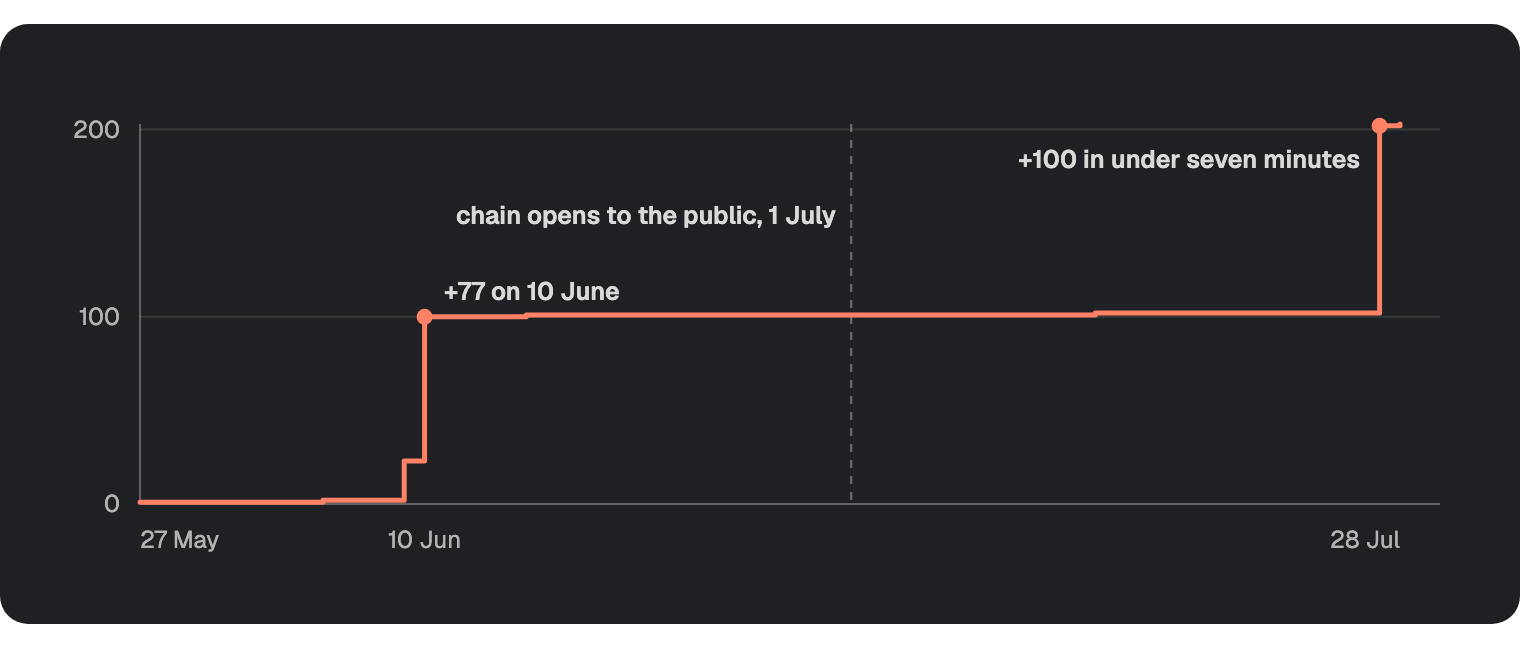
Cumulative tokenized assets deployed by the StockFactory contract, 27 May to 28 July 2026. Read from the contract's own Deployed events through HyperSync on 8 September 2026. The chain opened to the public on 1 July, by which point 101 of the 203 deployed by 28 July already existed.
If you'd hardcoded a token list in June, you'd have been missing half the chain by the end of July without knowing it. That's the main reason our indexer discovers contracts on its own.
Building the Robinhood Chain Indexer
The whole Robinhood Chain indexer comes down to three files. config.yaml says which chain, contracts and events to watch, schema.graphql says what to store, and a single handler does the work. HyperIndex turns those into a GraphQL API. If it's your first indexer, the quickstart covers the basics.
Prerequisites
- Node.js 22 or newer. HyperIndex uses
fs.promises.globto auto-load handlers, and on Node 20 it fails withPromises.glob is not a function. - Docker running, for the local Postgres and Hasura that
envio devstarts. - A free Envio API token. HyperIndex reads it from
ENVIO_API_TOKEN, which it will pick up from a.envfile in the project root. Keep that file out of git.
mkdir robinhood-stock-indexer && cd robinhood-stock-indexer
pnpm init
pnpm add envio viem
pnpm add -D typescript @types/node
If the install stops with ERR_PNPM_IGNORED_BUILDS for esbuild, run pnpm approve-builds esbuild, then continue.
Set "type": "module" in your package.json, since the handlers use ESM imports. Neither envio codegen nor envio dev checks types, so if you want type errors caught before the indexer starts, add a tsconfig.json and run pnpm exec tsc --noEmit yourself. @types/node is what makes process.env work in the handler below.
config.yaml
There are two contracts in the config, but only one has an address. StockFactory lives at a fixed address. StockToken has no address on purpose, because the indexer finds every instance at runtime from the factory's Deployed event. The alternative would be pasting every token address into this file, which would take it from 26 lines to more than 200, and you'd have to update it every time Robinhood adds a token.
There are two start blocks in the config, and they do different jobs.
start_block: 0on the chain is for finding tokens. It reads the factory from the very first block, so every token gets found. Leave it at 0. If you raise it, the early tokens are skipped and you won't get an error.start_block: 44000000onStockTokenis for speed. Transfers are only indexed from that block onwards, so a first run finishes quickly. HyperSync skips the blocks before it and only pulls the factory's deployment events from them.
Robinhood Chain is supported by HyperSync, so you don't need to configure an rpc block.
# yaml-language-server: $schema=./node_modules/envio/evm.schema.json
name: robinhood-stock-indexer
description: Tokenized asset activity on Robinhood Chain (chain 4663)

contracts:
  # Robinhood's StockFactory deploys every tokenized asset on the chain and
  # emits Deployed with the new token's address, name and symbol.
  - name: StockFactory
    events:
      - event: "Deployed(bytes32 indexed uid, address stock, string name, string symbol)"

  # No address here. Every instance is discovered from the factory at runtime.
  - name: StockToken
    events:
      - event: "Transfer(address indexed from, address indexed to, uint256 value)"

chains:
  - id: 4663 # Robinhood Chain. HyperSync is the default data source.
    start_block: 0 # HyperSync fast-forwards to the factory's first deployment
    contracts:
      - name: StockFactory
        address: "0x4783C67b63dE2B358Ac5951a7D41F47A38F3C046"
      - name: StockToken
        # Discover every token from genesis, but only index transfers from a
        # recent block so a first run finishes in minutes.
        start_block: 44000000
Don't add timestamp under field_selection. It's already a default block field, along with number and hash, and the config rejects it rather than ignoring it. You only need to ask for fields that aren't there by default, such as transaction.hash. For those, we'd use the per-handler fields option on indexer.onEvent, which is the recommended way, though config-level field_selection also works. This indexer needs neither, because it only reads block number and timestamp.
schema.graphql
Our schema stores totals rather than a row per transfer. The window we indexed alone had over 8 million transfers, and per-token totals stay small and answer the common questions.
netChange is not a wallet balance, and we named it that way on purpose. The indexer starts at a recent block, so it can't see anything an account held before then. When a long-time holder sells for the first time, the figure goes negative. That's correct for what it measures, which is movement during the indexed window, but calling it balance would mislead anyone who queries it. The same goes for activeAccounts. It counts accounts seen in the window, not current holders, because a real holder count needs balances from genesis.
type StockToken {
  id: ID! # token contract address
  symbol: String!
  name: String!
  decimals: Int!
  transferCount: BigInt!
  totalVolume: BigInt!
  activeAccounts: Int!
  firstBlock: BigInt!
  lastBlock: BigInt!
}

type TokenFlow {
  id: ID! # <token address>-<account address>
  token: StockToken!
  account: String! @index
  # Net movement across the indexed window, not a wallet balance. Anything held
  # before the start block is invisible here, so this can be negative.
  netChange: BigInt!
  transferCount: BigInt!
}

type DailyTokenStat {
  id: ID! # <token address>-<day index>
  token: StockToken!
  day: Int! @index
  volume: BigInt!
  transfers: Int!
}
The Handler
indexer.contractRegister is how dynamic contract registration works. It runs before the event handlers, and context.chain.StockToken.add() tells the indexer to start watching an address it didn't know about when it started. If you're coming from subgraphs, it's the equivalent of calling DataSource.create() on a template.
The Deployed event already gives us the name and symbol, so the StockToken entity is built from the event with no extra lookups. The only thing missing is decimals, and that goes through the Effect API. Handlers run twice because of preload optimisation, so a plain fetch inside a handler would fire twice per event. createEffect batches, memoises and caches the call instead, so you get one read per token for the whole sync.
Entities you get back from get are read only, so spread them into a new object instead of changing them directly.
Show the full handler, src/handlers/StockToken.ts
import { indexer, createEffect, S } from "envio";
import { createPublicClient, http, erc20Abi, getAddress } from "viem";

const ZERO = "0x0000000000000000000000000000000000000000";
const DAY = 86_400;

const client = createPublicClient({
  transport: http(
    process.env.ENVIO_RPC_URL ?? "https://rpc.mainnet.chain.robinhood.com",
  ),
});

// decimals is the one field the Deployed event doesn't carry. The Effect API
// batches, memoises and caches it, so each token is read once for the whole sync.
const getDecimals = createEffect(
  {
    name: "getDecimals",
    input: S.string,
    output: S.number,
    cache: true,
    rateLimit: { calls: 5, per: "second" },
  },
  async ({ input }) =>
    client.readContract({
      address: getAddress(input),
      abi: erc20Abi,
      functionName: "decimals",
    }),
);

// Discover every tokenized asset from the factory instead of hardcoding a list.
indexer.contractRegister(
  { contract: "StockFactory", event: "Deployed" },
  async ({ event, context }) => {
    context.chain.StockToken.add(event.params.stock);
  },
);

// The same event carries the metadata, so no lookup is needed for name or symbol.
indexer.onEvent(
  { contract: "StockFactory", event: "Deployed" },
  async ({ event, context }) => {
    const decimals = await context.effect(getDecimals, event.params.stock);
    context.StockToken.set({
      id: event.params.stock,
      symbol: event.params.symbol,
      name: event.params.name,
      decimals,
      transferCount: 0n,
      totalVolume: 0n,
      activeAccounts: 0,
      firstBlock: BigInt(event.block.number),
      lastBlock: BigInt(event.block.number),
    });
  },
);

indexer.onEvent(
  { contract: "StockToken", event: "Transfer" },
  async ({ event, context }) => {
    const tokenId = event.srcAddress;
    const { from, to, value } = event.params;
    const blockNumber = BigInt(event.block.number);
    const day = Math.floor(event.block.timestamp / DAY);

    const senderId = `${tokenId}-${from}`;
    const receiverId = `${tokenId}-${to}`;
    const [token, sender, receiver] = await Promise.all([
      context.StockToken.get(tokenId),
      from === ZERO ? undefined : context.TokenFlow.get(senderId),
      to === ZERO ? undefined : context.TokenFlow.get(receiverId),
    ]);
    if (!token) return; // transfer from a contract the factory never deployed

    // Both sides can be the same address, so accumulate per account before
    // writing. A self transfer then nets to zero and counts once, rather than
    // writing twice and leaving the second write to win.
    const delta = new Map<string, bigint>();
    if (from !== ZERO) delta.set(from, (delta.get(from) ?? 0n) - value);
    if (to !== ZERO) delta.set(to, (delta.get(to) ?? 0n) + value);

    // Count an account the first time it appears in the window. This is
    // countable from partial history, unlike a holder count, which would need
    // balances from genesis.
    let newAccounts = 0;

    for (const [account, change] of delta) {
      const existing = account === from ? sender : receiver;
      if (!existing) newAccounts += 1;
      context.TokenFlow.set({
        id: `${tokenId}-${account}`,
        token_id: tokenId,
        account,
        netChange: (existing?.netChange ?? 0n) + change,
        transferCount: (existing?.transferCount ?? 0n) + 1n,
      });
    }

    context.StockToken.set({
      ...token,
      transferCount: token.transferCount + 1n,
      totalVolume: token.totalVolume + value,
      activeAccounts: token.activeAccounts + newAccounts,
      lastBlock: blockNumber,
    });

    const statId = `${tokenId}-${day}`;
    const stat = await context.DailyTokenStat.getOrCreate({
      id: statId,
      token_id: tokenId,
      day,
      volume: 0n,
      transfers: 0,
    });
    context.DailyTokenStat.set({
      ...stat,
      volume: stat.volume + value,
      transfers: stat.transfers + 1,
    });
  },
);
Running It
echo "ENVIO_API_TOKEN=your_token_here" > .env
pnpm envio codegen
pnpm envio dev
envio dev starts Postgres and Hasura in Docker, applies the schema and starts syncing. You'll get a GraphQL playground at http://localhost:8080.
Token discovery happens first. HyperSync skips through the 44 million blocks before the transfer window, pulling only the factory's deployment events, so every token that existed by then is registered before a single transfer gets processed. Anything deployed later gets picked up when the indexer reaches it.
Our run over the transfer window processed 8,029,642 transfer events, which ended up as 332,975 account flow rows and 549 daily stat rows. All 203 tokens that existed at the time were registered, and 172 of them had at least one transfer in that window. The envio_chains table shows 8,029,845 events. That's the same number plus the 203 factory deployment events, so the two differ by exactly 203.
That's why we register every token whether it trades or not. A list built from what was trading would have found 172 and missed the other 31.
HyperSync Versus HyperRPC
Getting every NVDA Transfer over the same 100,000 blocks as the discovery sweep took 4.90 seconds as a native HyperSync query and 4.46 seconds as eth_getLogs against HyperRPC, and both returned the same 23,175 logs. Those times shift by a few tenths each run, so we'd call them a tie, which fits with HyperRPC being built on HyperSync. If your code already speaks JSON-RPC and you know which contract you want, just change the URL.
What made a real difference was chunk size. Dropping from 10,000 to 2,000 blocks per request took the same job from 4.46 seconds to 11.63 seconds, about 2.6 times as long, just from the extra round trips. If an RPC backfill is slow, chunk size is the first thing we'd look at.
The bigger difference is what you can ask for. The discovery sweep asked for every log from every contract across 100,000 blocks, and got all 4,166,782 back by paging through a single query.
Our take is that either interface is fine when you know which contract you want. If you're exploring a chain you don't know yet, or indexing thousands of contracts at once, HyperSync is the better fit, because it lets you ask for everything and page through it.
What the Data Shows
Almost all the activity sits in a small group of tokens. The twenty busiest account for 90.9% of every transfer across the chain's tokenized stocks, and the top five alone make up 39.7%. At the other end, 132 tokens had some transfers but fewer than a thousand in three days, and another 31 had none at all.
| Group | Tokens | Share of all transfers |
|---|---|---|
| Top 5 | 5 | 39.7% |
| Top 10 | 10 | 60.4% |
| Top 20 | 20 | 90.9% |
| Remainder that traded | 152 | 9.1% |
| No transfers at all | 31 | 0% |
Share of the 8,029,642 transfers indexed across blocks 44,000,000 to 46,622,364, grouped by token rank. Computed from the indexer's own StockToken table.
It's even clearer as a running total. Thirty tokens get you to 99.2%, and the other 173 together add the last 0.8%.
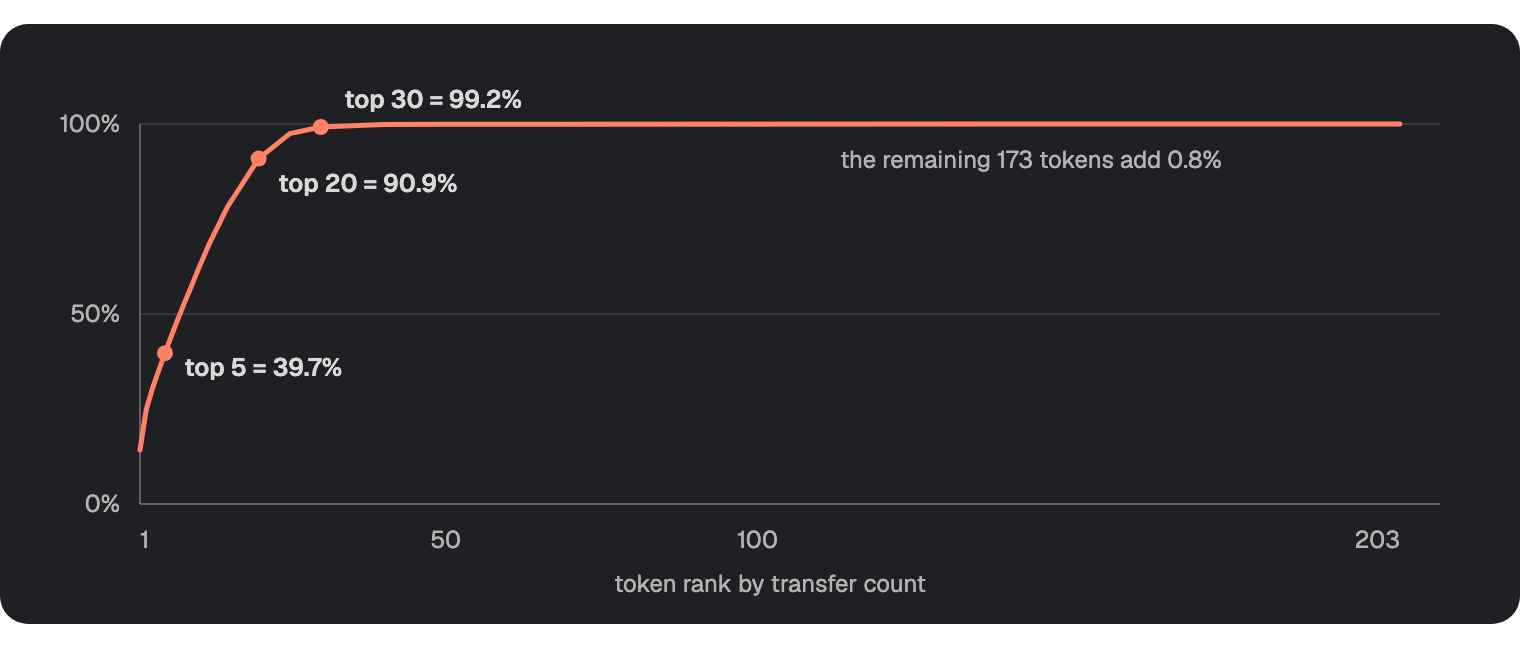
Cumulative share of the 8,029,642 indexed transfers as tokens are added in order of activity. Every point computed from the indexer's StockToken table.
The 31 with no transfers include some big names, like BA for Boeing, MDB for MongoDB, WDAY for Workday and ZS for Zscaler. Nine of the 31 aren't in Robinhood's active asset list. The other 22 were active when we checked and simply had no transfers in that window. Either way, if you found tokens by looking for recent activity, you'd never see them.
Another way to look at it is transfers per account. It separates tokens that lots of people touched from tokens a handful of addresses moved over and over.
| Symbol | Transfers | Accounts | Transfers per account |
|---|---|---|---|
COIN | 300,347 | 6,408 | 46.9 |
BE | 209,137 | 4,504 | 46.4 |
USAR | 211,786 | 4,734 | 44.7 |
SPCX | 1,139,971 | 29,748 | 38.3 |
AAPL | 387,508 | 21,486 | 18.0 |
NVDA | 849,198 | 47,886 | 17.7 |
TSLA | 362,090 | 20,716 | 17.5 |
GME | 179,748 | 14,104 | 12.7 |
Transfers divided by distinct accounts seen sending or receiving, for eight of the twenty busiest tokens in the window.
COIN and NVDA sit at opposite ends. Coinbase had 46.9 transfers per account against NVIDIA's 17.7, with about a third as many transfers overall. That looks like a small number of addresses moving the token a lot, rather than lots of holders moving it once or twice. GME, at 12.7, is the most widely spread of the busy tokens.
Querying the Result
Once it's running, http://localhost:8080 gives you a Hasura console over the data. Because the schema stores totals, most questions are one query each.
Which tokenized stocks see the most activity?
query BusiestTokens {
  StockToken(order_by: { transferCount: desc }, limit: 10) {
    symbol
    transferCount
    activeAccounts
  }
}
{
  "StockToken": [
    { "symbol": "SPCX", "transferCount": "1139971", "activeAccounts": 29748 },
    { "symbol": "NVDA", "transferCount": "849198", "activeAccounts": 47886 },
    { "symbol": "SPY", "transferCount": "450090", "activeAccounts": 14446 },
    { "symbol": "AAPL", "transferCount": "387508", "activeAccounts": 21486 },
    { "symbol": "TSLA", "transferCount": "362090", "activeAccounts": 20716 },
    { "symbol": "MSFT", "transferCount": "352257", "activeAccounts": 17726 },
    { "symbol": "PLTR", "transferCount": "339595", "activeAccounts": 14934 },
    { "symbol": "MU", "transferCount": "327375", "activeAccounts": 15119 },
    { "symbol": "GOOGL", "transferCount": "322250", "activeAccounts": 17713 },
    { "symbol": "AMD", "transferCount": "322031", "activeAccounts": 14768 }
  ]
}
In this window SPCX had 1,139,971 transfers across 29,748 distinct accounts, well ahead of NVDA on 849,198.
Which accounts built up the most of a given token over the window? netChange is a raw integer, so divide by 10 ** decimals to get a token amount. To get shares, multiply that by the token's uiMultiplier(), which Robinhood uses to apply stock splits and dividends. It's 1 for most tokens, but it was 4 for CRWD when we checked. The indexer stores raw amounts, so apply the multiplier when you read them. Token ids are stored as checksummed addresses, the mixed-case form you see in the explorer, so filter with that exact form or you'll get nothing back.
query TopAccumulators {
  TokenFlow(
    where: { token_id: { _eq: "0xd0601CE157Db5bdC3162BbaC2a2C8aF5320D9EEC" } }
    order_by: { netChange: desc }
    limit: 10
  ) {
    account
    netChange
    transferCount
  }
}
And daily activity for one token, which is what you'd put behind a chart.
query DailyActivity {
  DailyTokenStat(
    where: { token_id: { _eq: "0x4a0E65A3EcceC6dBe60AE065F2e7bb85Fae35eEa" } }
    order_by: { day: desc }
    limit: 14
  ) {
    day
    transfers
    volume
  }
}
Replicate This With Your Own Agent
If you'd rather hand this to a coding agent, use the prompt below. We wrote it from the finished indexer, and it includes the problems we ran into so your agent doesn't hit them too.
Give the agent our current docs first, so it works from the latest syntax instead of whatever it remembers.
claude mcp add --transport http envio-docs https://docs.envio.dev/mcp
Cursor and VS Code use the same endpoint in their MCP settings. The same search is also built into the CLI as envio tools search-docs, so an agent with shell access doesn't need MCP at all. Both are covered on the MCP server page.
Then paste this.
Show the full prompt
Build me an Envio HyperIndex indexer for the tokenized assets on Robinhood Chain.

Target the current HyperIndex. Install with `pnpm add envio viem`, and read the
live docs before writing code, since syntax can change between releases.

Before writing any code, read the current docs rather than working from memory.
If you have the envio-docs MCP server, use docs_search and docs_fetch. Otherwise,
run `envio tools search-docs <query>` and
`envio tools fetch-docs <url>`. Look up the configuration file, event handlers,
dynamic contracts and the Effect API before you start.

THE CHAIN AND THE CONTRACTS

Robinhood Chain is chain ID 4663. HyperSync is the default data source, so the
config needs no rpc block for indexing. Every tokenized asset on the chain is
deployed by a single factory at 0x4783C67b63dE2B358Ac5951a7D41F47A38F3C046,
which emits

  Deployed(bytes32 indexed uid, address stock, string name, string symbol)

Each token is a standard ERC-20 emitting

  Transfer(address indexed from, address indexed to, uint256 value)

Do not hardcode a token list. Use dynamic contract registration so the indexer
discovers every token from that factory event at runtime, then indexes Transfer
events on each token it discovered. Concretely, the token contract gets an entry
under chains[].contracts with a start_block and no address at all. Omitting the
address is what marks it dynamic, and that same addressless entry is where the
per-contract start_block below belongs.

WHAT TO STORE

Per token, store symbol, name, decimals, transfer count, total volume, and the
number of distinct accounts seen transferring it.

Per account per token, store net movement across the indexed window and a
transfer count. Call it net movement, not balance. Tokens held before the start
block are invisible to the indexer, so this figure can legitimately be negative
and it is not a wallet balance.

Per token per day, store transfer count and volume.

PROJECT SETUP

  mkdir robinhood-stock-indexer && cd robinhood-stock-indexer
  pnpm init
  pnpm add envio viem
  pnpm add -D typescript @types/node

If the install stops with ERR_PNPM_IGNORED_BUILDS for esbuild, run
`pnpm approve-builds esbuild`, then continue.

Set "type": "module" in package.json, because the handlers use ESM imports.
Neither `envio codegen` nor `envio dev` typechecks, so write a tsconfig.json and
run `pnpm exec tsc --noEmit` yourself before starting the indexer. Without that
step none of the type errors below can ever reach you. @types/node is what makes
process.env resolve. Handler imports do not need a .js extension, because the
envio loader resolves TypeScript itself.

Handlers auto-load from src/handlers/. Put the Envio API token from
https://envio.dev/app/api-tokens in .env as ENVIO_API_TOKEN, and add .env to
.gitignore before your first commit.

Run it with `pnpm envio codegen` then `pnpm envio dev`. `envio dev` is what
starts Postgres and Hasura in Docker and applies the schema, so Docker must be
running. `envio start` does not bring those containers up. Read your answers off
the GraphQL playground on http://localhost:8080.

THE ONE CONTRACT READ, AND WHY IT NEEDS AN RPC

name and symbol arrive in the Deployed event, so never read them from the
contract. Only decimals needs a contract read.

That read cannot go through HyperSync or HyperRPC, because neither implements
eth_call. It needs an ordinary JSON-RPC endpoint. Use a viem client pointed at
https://rpc.mainnet.chain.robinhood.com, and let ENVIO_RPC_URL override it. That
public endpoint is rate limited and Robinhood does not recommend it for
production, which is fine here because the call happens once per token.

Wrap it in the Effect API with cache: true so it runs once per token rather than
once per event. rateLimit is required on createEffect, not optional, so supply it.
When it is done the indexer schema holds one row per token in
envio_effect_getDecimals, and every token reports 18 decimals.

Exclude the zero address throughout. It is not an account, so it gets no
per-account row and does not count toward the distinct-account total. Mints and
burns still count toward the token's transfer count and total volume.

TRAPS THAT WILL COST YOU TIME

- Node.js 22 or newer, because the handler auto-loader calls `fs.promises.glob`,
  which does not exist before Node 22. On Node 20 the indexer exits with code 1
  almost immediately and the error reads `Failed to glob src/handlers directory
  for auto-loading handlers. Pattern: ./src/handlers/**/*.{js,mjs,ts}. Before
  continuing, check that you're using Node.js >=22 version. Error: TypeError:
  Promises.glob is not a function`. It names the version it needs, so it is
  self-diagnosing, but it lands after Postgres and Hasura are already up, which
  makes it look like a database problem when it is not.
- The chain-level start_block must be 0. The factory's first deployment is at
  block 19,698, so a later chain-level start_block skips most tokens. Skipping
  them is not an error, so the indexer runs cleanly and quietly misses them.
- Put a per-contract start_block of 44000000 on the token contract instead. That
  keeps discovery complete while indexing transfers only from a recent block.
  Budget for it. That window is about three days of the chain's densest blocks,
  roughly 8 million transfer events, and takes tens of minutes. It is not a
  two-minute run, so do not assume it has hung.
- Do not add timestamp to field_selection. It is already a default block field,
  and asking for it fails config parsing with "unknown variant `timestamp`".
  event.block.timestamp is available without any field selection at all. If you
  do need a non-default field such as transaction.hash, prefer the per-handler
  `fields` option on indexer.onEvent, which is the recommended form.
- The contractRegister callback must be async. A synchronous one fails
  typechecking with "Type 'void' is not assignable to type 'Promise<void>'".
- A Transfer whose sender and receiver are the same address maps to a single
  account row. Read both account rows before writing either, then accumulate the
  net change and write once. Otherwise the second write silently discards the
  first and that account's net movement is wrong by the full transfer value.
  A self transfer should count once, and its net change is zero.
- Handlers run more than once per event because of preload optimisation, so keep
  them free of side effects outside the context API, and do your reads up front.
- Running headless, set ENVIO_TUI=false. To skip Hasura entirely, set
  ENVIO_HASURA=false. Both are booleans, and Hasura defaults to on.
- Progress lives in the envio_chains table, columns progress_block, source_block
  and events_processed. You are finished when progress_block reaches source_block,
  and source_block keeps moving because it tracks the head.
- Hasura is password gated. The local admin secret is `testing`.
- `envio dev` binds port 9898 and fails outright if it is taken. ENVIO_INDEXER_PORT
  moves it.

WHEN IT RUNS, REPORT THESE SEPARATELY

1. How many tokens the factory registered. State the exact number you got.
   The set grows over time, so expect more than 200 and give the exact figure.
2. How many Transfer events were processed, and how far through the window you
   are. A partial run gives a different top five than a finished one, so say
   which you are reporting.
3. The five busiest tokens by transfer count.
Deploying the Indexer
If you'd rather clone the indexer than copy the files above, the whole thing is on GitHub at enviodev/robinhood-stock-indexer.
When you want to keep it online, push the repo to GitHub and deploy it on Envio Cloud. It handles the database, the GraphQL API and the syncing for you.
Frequently Asked Questions
What Is the Robinhood Chain RPC URL and Chain ID?
Robinhood Chain uses chain ID 4663 on mainnet and 46630 on testnet, with ETH as the native gas token. The public mainnet RPC is https://rpc.mainnet.chain.robinhood.com and the public testnet RPC is https://rpc.testnet.chain.robinhood.com. Robinhood's documentation describes these public endpoints as rate limited and not recommended for production, and recommends a provider endpoint for production traffic. For read-heavy and indexing workloads, Envio serves HyperSync at https://robinhood.hypersync.xyz and a read-only JSON-RPC endpoint at https://robinhood.rpc.hypersync.xyz.
What Is the Robinhood Chain Block Explorer?
Robinhood Chain's mainnet block explorer is Blockscout at robinhoodchain.blockscout.com, and the testnet explorer is at explorer.testnet.chain.robinhood.com. Each address page shows details such as which address deployed a contract. For every log a contract has ever emitted, use HyperSync instead. The wallet-facing network values are also listed on Chainlist under chain 4663.
Does Robinhood Chain Have a Sequencer Feed?
Yes. Robinhood Chain publishes a sequencer feed at wss://feed.mainnet.chain.robinhood.com and a sequencer endpoint at https://sequencer.mainnet.chain.robinhood.com, with matching testnet endpoints, all listed in Robinhood's connection docs. Because the chain is built on the Arbitrum stack, the feed streams transactions as the sequencer accepts them, ahead of the batch being posted to Ethereum, so it is the right tool for pre-confirmation ordering. It carries no history and has no query interface, so it is not a substitute for indexing. A common pairing is the feed for the newest activity and HyperSync or HyperIndex for confirmed history.
Can I Use HyperRPC as the RPC Endpoint in My Wallet or Dapp?
No. HyperRPC is a read-only endpoint built for data-intensive queries such as eth_getLogs, block reads and transaction reads. It does not implement eth_call and it cannot broadcast transactions, so it will not work as a general purpose wallet or dapp RPC. Use it alongside a normal provider endpoint, with HyperRPC serving your read and analytics paths and the provider handling state calls and transactions.
Do I Need an Archive Node to Index Robinhood Chain History?
Not with Envio. Robinhood's own documentation notes that historical reads and indexing require an archive endpoint, which usually means paying a provider for archive access. HyperSync serves the chain's full history directly, so a HyperIndex indexer with start_block: 0 backfills from genesis without you provisioning or paying for an archive node.
How Do I Find Every Tokenized Asset Contract on Robinhood Chain?
Read them off the factory. Every tokenized asset on Robinhood Chain is deployed by a StockFactory contract at 0x4783C67b63dE2B358Ac5951a7D41F47A38F3C046, which emits Deployed(bytes32 indexed uid, address stock, string name, string symbol) once per asset. Querying that contract's full log history returns every token it has deployed with its address, name and symbol, and no token list is needed. If you only want the active ones, Robinhood's assets API lists them. The count grows as Robinhood issues more, which is why reading the contract beats keeping a list. Scanning for contracts that emit Transfer and filtering on the • Robinhood Token name suffix also works, but it only finds tokens that have traded recently, which was 46 across the 2.8 hour window we measured.
Why Is SPCX the Busiest Tokenized Asset on Robinhood Chain?
SPCX is Robinhood's tokenized SpaceX stock. It was deployed as SpaceX • Robinhood Token, and its live name() now reads Space Exploration Technologies Corp. Class A Common Stock • Robinhood Token. Across the 2.6 million block window we indexed, it emitted more Transfer events than any other tokenized stock on the chain, ahead of NVIDIA, SPY and Apple. That's a count of transfer events, not trading volume or value, and we haven't tried to explain why it leads.
Can I Index Robinhood Chain Alongside Other Chains in One Indexer?
Yes. HyperIndex is multichain by default, so you add further networks under the chains key in the same config.yaml and the same handlers receive events from all of them, with event.chainId telling you which chain each event came from. The multichain indexing docs cover the details. This is useful on Robinhood Chain specifically, because assets arrive over the canonical Arbitrum bridge and you often want the Ethereum or Arbitrum side of a position in the same dataset.
What Does the • Robinhood Token Suffix Mean in a Token Name?
It is the naming convention Robinhood uses for the tokenized assets it issues. The name() value reads as the underlying instrument followed by that suffix, for example NVIDIA • Robinhood Token or SPDR S&P 500 ETF Trust • Robinhood Token, while symbol() returns the familiar ticker such as NVDA or SPY. The separator is a bullet character rather than a hyphen, which matters if you string match on it. Matching on the name is not the most reliable way to enumerate them though, since the factory's Deployed event gives you the same information without any string handling.
Build With Envio
Envio is a real-time multichain blockchain indexer that turns onchain events into a queryable GraphQL API. Robinhood Chain has first-class support, so HyperSync, HyperRPC and HyperIndex all work on it out of the box. Start indexing Robinhood Chain, deploy on Envio Cloud or self-host, and if you're building on Robinhood Chain, come talk to us about your data needs.
Website | X | Discord | Telegram | GitHub | YouTube | Reddit